"Imo" has finally launched, but overseas players might first face the "login hurdle"
After a long wait, "Imo" has finally officially met its players.
The PC and cloud versions are now available, with the mobile version coming soon. A more convenient feature is that game progress can be synced across different devices, which is a real time-saver for players who switch between computers and phones.
The game itself is also quite addictive.
Running around the continent of Eider, you'll want to catch every new Imo you see; once caught, you can study their abilities and experiment with fusions—whether for flying, diving, exploring, or battling, each has different gameplay.
You can wander around slowly on your own, or team up with friends.
The problem is—
When you're overseas, sometimes before you even start catching Imos, you get worn out by the login and network issues.
Recently, some players in the community have reported login failures on the Steam version; others have mentioned long wait times for the cloud version.
Queues or slow loading during the initial launch aren't particularly surprising. The official launch notice itself warned that players might experience queues and slower loading speeds during peak times.
So, here is a very important judgment:
Not being able to log in isn't always an overseas network issue.

First, distinguish: is it a server problem, or your own network problem?
Many players' first reaction when they encounter "lag" is to switch lines.
Actually, there's no need to be so hasty.
Observing the symptoms often makes it easier to judge.
If many players can't get in at the same time,
For example, if the community suddenly sees a flood of:
"Login failed"
"Queuing for ages"
"Did the server crash?"
"Can't get into the cloud version"
discussions like these, then you should first pay attention to official announcements and server status.
During the launch phase when players are logging in simultaneously, server queues, login system issues, or temporary anomalies in the game itself can all affect the experience.
In recent player discussions, some have reported long wait times for the cloud version and some basic functional anomalies during the initial launch.
In such cases, constantly reinstalling the game or switching lines doesn't really help much.
If others are fine, but only you have consistently high latency,
that's a different situation.
Especially if you are in:
the US, Canada, UK, Germany, France, Australia, Singapore, Japan, etc.,
where your local internet is usually fast—browsing websites and watching short videos are fine—but as soon as you play a domestic game, you encounter:
Extremely long login and loading times;
Latency numbers fluctuating wildly;
Occasional sudden freezes while running around the map;
Slow response for pet-catching actions;
Noticeable delays in operations during fusions;
Difficulty staying synced when teaming up with friends in China;
Significantly more lag at night than during the day.
Then it is worth checking from the perspective of:the network path from overseas to domestic game services.It's worth investigating.
Because fast speed on a standard speed test doesn't mean the game connection is stable.
Multiplayer online games prioritize continuous response and network stability.
When playing "Imo", what overseas players find most annoying is often not the "slowness", but the inconsistency.
If the latency is consistently slightly high, sometimes you can actually adapt to it.
What really ruins the experience is—
everything is normal one second, and then suddenly there's no response.
This situation is particularly obvious in "Imo".
For example, you just saw an Imo you want to catch.
You run over.
You prepare to act.
The network suddenly jitters.
Or when exploring with friends, you are clearly standing together, but your position and your teammate's position are already out of sync.
Or after fusing, you prepare to fight, but the skill activation feels delayed.
You can tolerate it once or twice.
But having it happen repeatedly all night is quite frustrating.
So, playing "Imo" from overseas doesn't necessarily mean chasing the lowest possible Ping for a single second.
Stability is actually more important.
To play the Chinese server of "Imo" from overseas, you can try the HiCN accelerator.
If the server itself is normal and the game client has no issues, but your problem is mainly high latency and significant fluctuations when connecting to domestic game services from overseas, then you can try to optimize the connection path using a return-to-China accelerator.
Here you can consider HiCN accelerator.
HiCN mainly targets the connection needs of overseas Chinese and international students when accessing domestic games and common network services, optimizing network transmission paths to reduce unnecessary detours and fluctuations during cross-border connections.
For a multiplayer online game like "Imo", what's more worth paying attention to is not the numbers on the promotional page, but whether there is a real difference in actual gameplay.
For example:
Is the login faster?
Does the game still freeze suddenly while running around?
Is the response for catching pets and combat stable?
Do you frequently disconnect when teaming up with friends in China for an hour or two?
These are the things that ordinary players can truly feel.
To play "Imo" on Windows, open it directly on your computer.
Players who have already started their adventure on PC can directly use the HiCN Windows client.
The usage logic is very simple:
Open HiCN → Select game acceleration → Connection successful → Launch "Imo".
If "Imo" is already running, you can exit the game and restart it.
This will make the test more accurate.
Don't rush to judge whether it's good or bad the first time you use it.
Enter the game and run around the map.
Catch a few Imos.
Team up with friends in China.
Play for at least a few dozen minutes to see how the stability is.
Once the mobile version is released, you can continue using it on iOS and Android.
Many "Imo" players are now concerned about one question:
After playing on the computer for a while, do I have to start over when the mobile version comes out?
There has been a lot of discussion in the player community about PC and mobile cross-progression.
According to the information currently released by the official team, the same account can continue game progress in the corresponding environment.
This is actually quite convenient for international students.
Use PC when you have a computer in the dorm.
Switch to your phone when you go out or when it's inconvenient to open the computer.
HiCN itself also supports:
Windows
iOS
Android
Compatible routers
So you don't need to change your entire network optimization method when switching devices later.
Why do I suggest newcomers try it for free for a few days first?
Because for things like accelerators, the experience is highly dependent on the network environment.
Even overseas,
the US West Coast is different from the UK.
Dorm internet is different from home broadband.
Even in the same city, using different local ISPs can lead to different actual experiences.
So when you see others say:
"It's very stable for me."
It can only serve as a reference.
The most effective method is to test it yourself.
HiCN currently offers new users a 3-7 day free trial.
You can take advantage of this time to test the time slots you play most often.
Don't test at 3 PM if you only really play at 10 PM.
Many people tend to overlook this issue.
For example, international students usually only have time to play games after class in the evening.
If you just log in for five minutes at noon during the trial:
"It's quite smooth."
But at night, when everyone in the dorm is back, streaming videos, downloading files, and playing games all at once, the network environment is completely different.
The test results naturally have no reference value.
It is recommended to:
test at the time you usually play.
If you like to play with friends in China on weekends, then test on weekends.
If you usually play for two or three hours at a time, don't just test for ten minutes.
This way, the results will be closer to the actual usage state.
What should you focus on testing after accelerating "Imo"?
There's no need to study a bunch of complex parameters.
Ordinary players only need to look at a few areas.
First, check the login:
How long does it take from launching the game to actually entering the character?
Are there:
Long loading circles;
Repeated connections;
Multiple re-logins;
Getting stuck halfway through loading.
If the server itself isn't queuing, but your login is consistently slow, this is a point worth comparing.
Second, check map movement:
After entering the game, don't just stand there and watch the latency.
Run around.
Teleport.
Change areas.
Do quests.
See if character movement and map loading are stable throughout the exploration process.
Because you can't just stand still while playing the game.
Third, check pet-catching and combat response:
One of the core experiences of "Imo" is catching, exploring, and fusing.
The impact on network response for these operations is quite noticeable.
If you often felt:
"I clearly pressed the button, why did it only move after a while?"
Then you can focus on comparing this after turning on network acceleration.
Fourth, check teaming up:
This is especially important.
Recently, there have been many posts in the player community looking for teammates and asking about multiplayer gameplay, which shows that teaming up is a feature many players care about.
Just because running around alone seems fine doesn't mean multiplayer online play will be problem-free.
So it's best to call a friend in China to play together.
Run around for a while.
This is much more reliable than just staring at latency numbers.
Still lagging after turning on acceleration? It might not be a network acceleration issue.
This also needs to be clarified.
Not all "lag" can be solved by game acceleration.
Frame drops, stuttering visuals:
If the latency looks normal, but:
Frame rate is low;
The view stutters when turning;
Frame drops in complex scenes;
Computer fans are spinning like crazy;
Then it's more likely an issue with device performance or game graphics settings.
In this case, it is recommended to prioritize checking:
Graphics card drivers;
Game graphics quality;
Resolution;
Background programs;
CPU and GPU usage;
Game file integrity.
Changing network lines won't make your graphics card perform better.
Everyone is queuing together:
If the official server happens to have a large number of players online at the same time and everyone else is waiting, then just be patient.
Players in the community have already reported long wait times for the cloud version.
This is an issue with server capacity or current game service status, so don't mistakenly assume your network is broken.
Dorm internet is especially slow at night:
This is very common for overseas international students.
During the day, there aren't many people in the dorm.
At night, everyone is back.
Some are watching 4K videos, some are downloading games, and others are on video calls.
Wi-Fi naturally becomes congested.
At such times, you can try a few simple operations:
Pause background downloads on your computer;
Turn off cloud sync;
Try to use 5GHz Wi-Fi;
Move closer to the router;
Use an Ethernet cable if possible;
Restart the router once;
Switch to other available HiCN lines to test.
Don't underestimate these operations; sometimes the local Wi-Fi is the real culprit.
If you play domestic games on multiple devices, you can also consider a router solution.
There is another type of overseas user that is quite special.
It's not just you playing at home.
The computer needs to play domestic games.
The phone needs to listen to domestic music.
The tablet is occasionally used for streaming.
Family members have other devices.
In this case, setting up each device individually is indeed troublesome.
HiCN also provides a compatible router usage method.
However, there are many router models, and the configuration method is not exactly the same for every one.
So before you prepare to use it, it's best to confirm:
Whether your router model is compatible.
Then configure it according to the official instructions.
This is much easier than finding out the model isn't suitable after buying it.
Playing "Imo" from overseas, don't waste your precious game time on repeated reconnections.
"Imo" has just officially launched, and many players have actually only just entered the continent of Eider.
Everyone wants to go see the map first.
Catch new Imos when they encounter them.
Study the fusions.
Then call friends in China to run around the map together at night.
The official team has also clarified that "Imo" is a multiplayer online open-world pet-catching RPG. Besides catching Imos, players can also gain different abilities through fusions and participate in multiplayer interactive gameplay. The PC client is currently available for download on the official website.
For overseas players, the network really doesn't need to be that complicated.
First, determine if it's a server issue.
If it's not a server issue, then check if it's a device issue.
If the device is fine, but you still have long-term high latency and significant fluctuations when connecting to domestic games from overseas, then use the HiCN accelerator to test.
HiCN supports Windows, iOS, Android, and compatible routers, and offers new users a 3-7 day free trial.
Test it for a few days on your real network.
Play a bit at night.
Team up on the weekend.
If you feel the connection performance meets your needs, then consider long-term use.
This is actually more practical.
After all, you're playing "Imo" to catch pets, explore, and play with friends, not to spend the whole night on login screens and network settings.
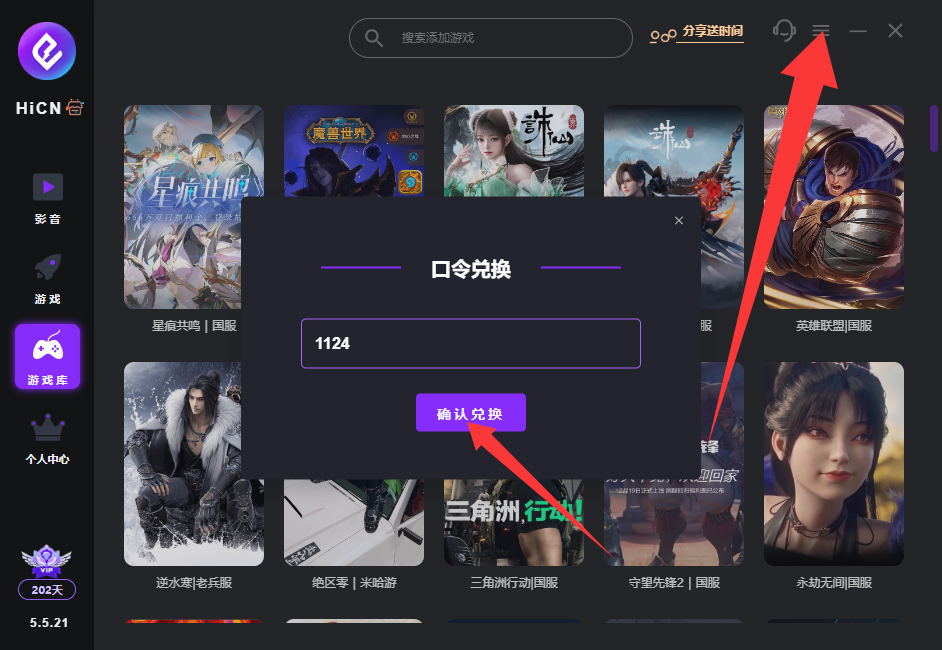
Finally, a quick reminder:You can use the HiCN code 1124 to get free membership acceleration time. The specific redemption details are subject to the activity page.