
Opening Honor of Kings to play with friends back home, only to face lag, teleporting heroes, and unresponsive skills—this is the most common frustration for overseas Chinese players trying to climb the ranks on the Chinese server. With the physical distance in North America, Europe, or Australia, and cross-border network paths that aren't as controllable as local ones, the result is erratic ping and mysterious 460ms spikes during critical team fights.
This article won't bore you with technical specs or empty talk. Instead, it follows a Identify Symptoms → Determine Next Steps approach, providing you with a repeatable troubleshooting process. After reading, you should be able to answer these questions:
● Is my lag caused by local issues or cross-border latency?
● Without a booster, how much can I actually optimize?
● After installing a booster, how can I tell if it's truly effective
?
I. 5 Typical Symptoms of Overseas Honor of Kings Players
Check your symptoms and see how many you have:
Symptom | Usually Means |
Ping in the top right is consistently ≥ 150ms | Cross-border link is the main cause; limited room for local optimization |
Sudden spikes to 460ms during team fights | Route jitter or instantaneous packet loss; requires a stable channel |
Obvious delay when tapping skills | High round-trip latency between client and server |
Lag when selecting heroes or entering the loading screen | Possible slow resolution of the login server |
Occasionally 80ms, suddenly jumps to 300ms | Link quality fluctuations during peak cross-border hours |
If any symptom appears more than 3 times, it's worth addressing seriously.
II. 5-Step Symptom-Driven Diagnostic Checklist
Follow these steps in order, and you can pinpoint the source of your lag in 5 to 10 minutes.
Step 1: Confirm Physical Connection
● Wired connection to router > 5G/4G > Wi-Fi
● If you must use Wi-Fi: Move closer to the router or switch to the 5GHz band
● If sharing the network, ask others to pause high-bandwidth activities (streaming, downloads, backups) while you play
Step 2: Close All Bandwidth-Hogging Applications
● Cloud sync, Steam downloads, YouTube/Twitch streaming, video conferencing, backup tasks
● If your router supports QoS, temporarily prioritize your gaming device
Step 3: Use In-Game Network Diagnostics
The latency reading in the top right corner of the Honor of Kings lobby is your baseline:
● Enter Training Mode for one match to see the stable value
● Enter a Matchmaking game to observe dynamic fluctuations
● Check the current ping again before entering Ranked
You can run a diagnostic in-game via "Settings → Network Diagnostics." It will output the latency for key nodes between your device and the login server, helping you pinpoint the issue. For the official guide, refer to the resources section on the Honor of Kings Official Website - Tencent Games .
Step 4: Test During Different Times
● 20:00–23:00 Beijing Time is the most congested period for cross-border links
● If ping is low on weekday mornings but spikes during evening peak hours, it's almost certainly a cross-border issue
Step 5: Determine if the Cross-Border Link is the Bottleneck
● Latency remains ≥ 150ms after the 4 steps above
● Fluctuation range > 50ms
● This is the physical reality of playing on the Chinese server from overseas; no amount of local tuning can fix this
Conclusion: If Step 5 hits, you need to upgrade from "local optimization" to "cross-border path optimization"—which is what a booster solution is for.
III. Local Optimization: What Works and What Doesn't
Not all "network optimization tips" are effective for latency. Here is a breakdown by effectiveness:
Effective (Can save 10–30ms or improve stability)
● Use a wired connection instead of Wi-Fi
● Close background programs consuming bandwidth
● Prioritize gaming traffic via router QoS
● Lower in-game graphics settings (especially particle effects, shadows, and high frame rate mode)
Limited Effect (Not recommended to spend much time on)
● Switch DNS: Only affects login server resolution; limited help for in-game latency
● Adjust MTU: High risk, low impact; average players should avoid this
Don't Bother
● Installing "game network optimization" apps on your phone: Often more hype than substance
● Using free shared nodes for Ranked: Security and stability are uncontrollable
IV. In-Game Settings Recommendations for Honor of Kings
In "Settings → Graphics":
● Frame Rate: "High" (30fps) is more stable than "Ultra" (60fps); latency-sensitive players should prioritize High
● Graphics Quality: Select "Smooth" or "Standard"
● Turn off particle effects, outlines, and other special effects
In "Settings → Combat":
● Turn off smart tracking in "Camera Sensitivity"
● Choose your preferred "Skill Cancellation Method" and stick to it to reduce misoperations
In "Settings → Network Diagnostics":
● Run a diagnostic and record the "Recent Latency," "Historical Latency," and "Packet Loss Rate"
● This data serves as your baseline for judging if a booster is effective
V. The Cross-Border Link is the Root Cause of Latency
Why is it hard for overseas players to get ping below 100ms through local optimization? Three unavoidable physical facts:
1. Physical Distance: Honor of Kings servers are primarily in China (Shenzhen, Shanghai, Guangzhou, etc.). The distance to overseas locations is thousands of kilometers, and the speed of light has its limits.
2. Cross-Border Routing Detours: The path between overseas ISPs and Chinese carriers involves submarine cables, transit nodes, and BGP routing that are beyond the control of average users.
3. Low QoS Priority on Public Internet: Gaming traffic has low priority on the public internet and is often crowded out by video, streaming, and enterprise VPN traffic during peak evening hours.
None of these three problems can be solved by "changing a router" or "adjusting DNS." Truly stable and playable latency (80–130ms for North America, 100–160ms for Europe, 50–100ms for Southeast Asia) requires a dedicated cross-border channel—which is exactly what a return-to-China booster provides.
VI. HiCN Booster Solution: Matching the Needs of Honor of Kings
Android Client QR Code is a return-to-China booster designed specifically for overseas Chinese players, with capabilities matching the key points of Honor of Kings latency optimization:
● Esports Dedicated Lines: Optimized routing for MOBA/FPS games to bypass public internet congestion
● Multi-Region Nodes: Covering North America (East/West), major European countries, Australia, Southeast Asia, Japan, and Korea for local access
● Smart Node Selection + Dual-Line Hot Standby: Automatic switching during node failures to prevent 460ms spikes
● Multi-Platform Coverage: Available on iOS, Android, Windows, and routers; mobile players can install the app directly
● Extended Trial Window: Unlike the common 1–7 day trials, HiCN offers a 3–7 day trial period, sufficient to complete the full verification process from Training Mode → Matchmaking → Ranked
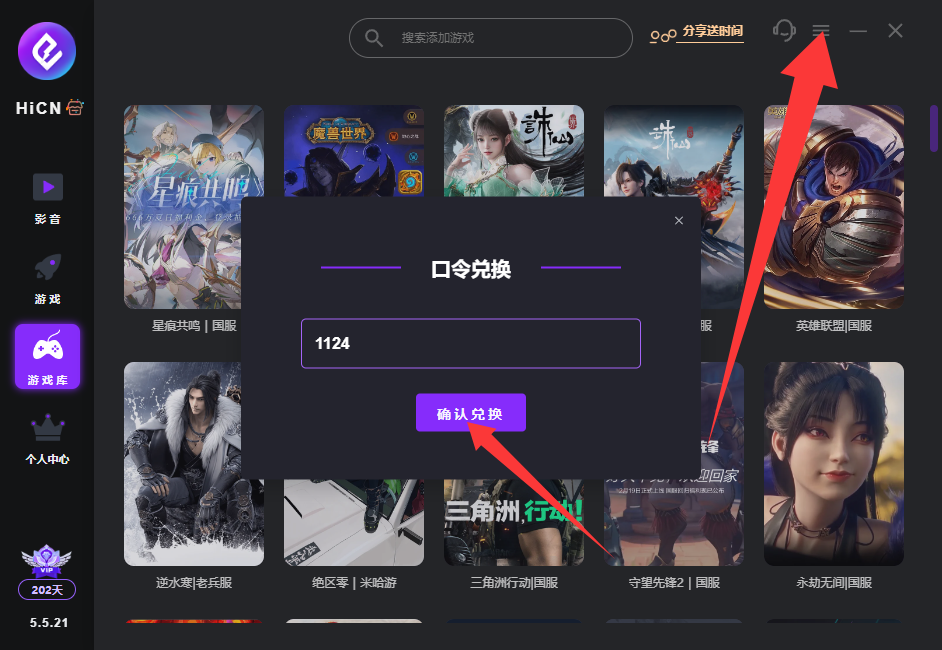
HiCN Return-to-China Booster Exclusive Member Code: 1124
VII. Verification Process After Boosting (Important)
Don't jump into Ranked immediately after installing the booster. Verify in this order:
Step 1: Training Mode Single-Match Test
● Run a match with the booster off and record lobby latency (Baseline A)
● Run a match with the booster on and record lobby latency (Baseline B)
● Compare the difference between A and B
Step 2: Matchmaking Test
● Play 2–3 matches with the booster to observe if ping is stable and if there are any spikes
Step 3: Ranked Test
● Only enter Ranked if matchmaking ping is stably below 150ms
● Check for 460ms spikes or teleporting during critical team fights
Step 4: Cross-Node Comparison
● If the booster provides multiple nodes (e.g., North America West/East), test each for 5–10 minutes to see which offers the best return path for your network
Criteria:
● Training and Matchmaking are both stably < 150ms: Safe to play Ranked
● Still frequently ≥ 200ms or 460ms: Change nodes / change time / contact support for troubleshooting
VIII. Latency Expectations by Region (Reference Range)
Below are the typical latency ranges for HiCN nodes in different regions. Data is for reference; actual performance varies by carrier, time, and device:
Region | Typical Latency Range | Experience Notes |
Southeast Asia (Singapore, Thailand, Malaysia) | 50–100ms | Close to native Chinese server experience |
Japan/Korea | 60–110ms | Stable, suitable for Ranked |
North America (West, East, Canada) | 80–130ms | Team fights are generally smooth |
Europe (UK, France, Germany, etc.) | 100–160ms | Slightly slower skill response but playable |
Australia (Sydney, Melbourne) | 120–180ms | Requires choosing the right return node |
Middle East, South America, parts of Africa | 150–220ms | Physically remote, requires dedicated lines |
If latency is stable within 150ms, most heroes won't feel "unresponsive," and the ranking experience will be very close to playing locally in China.
IX. Common Misconceptions and Pitfalls
● Closer nodes are not always better: Geographic proximity does not equal good return link quality; always test and compare
● Don't switch nodes frequently during a game: Will trigger packet loss and login server reconnections
● Don't use free/shared nodes for Ranked: Account security and stability are uncontrollable
● Don't run downloads while playing: Any large background traffic will hog your gaming bandwidth
● Enable "Do Not Disturb" and close background apps on mobile: Avoid system calls or notifications interrupting the game process
● Don't treat "High Frame Rate" and "Esports Dedicated Line" as opposites: Combining both is best; the former reduces screen tearing, the latter stabilizes network latency
X. When to Upgrade to Router-Level Acceleration
If you encounter the following, consider upgrading from a "single-device client" to "router-level acceleration":
● Multiple devices playing on the Chinese server at home (phone + tablet + PC emulator)
● Don't want to install clients on every device
● Want to boost consoles like Switch / PS5 that don't support clients
● Long-term stable usage, hoping for "configure once, benefit the whole family"
HiCN provides router-level acceleration, moving the boosting capability to the gateway layer so all devices in the house benefit automatically.
Conclusion: The Path from Symptoms to Solutions
High latency when playing Honor of Kings overseas isn't "mystical." Follow this diagnostic checklist, and you can pinpoint the bottleneck in 5 to 10 minutes:
1. Optimize what you can locally first (wired / close background apps / adjust graphics)
2. Establish a baseline using in-game latency readings
3. Determine if the bottleneck is local or cross-border
4. Leave cross-border bottlenecks to esports-grade boosters
5. Verify step-by-step: Training Mode → Matchmaking → Ranked
If you are worried about lag, try using the Android Client QR Code trial window to run a few verification tests. See if latency and stability improve before deciding on long-term use.
Overseas isn't a forbidden zone for the Chinese server. With the right methods and tools, you can keep up with the rhythm of team fights.