Why is World of Warcraft: Infinity worth the attention of overseas veterans?
If it were just a simple re-release of an old version, it probably wouldn't have sparked so much discussion.
The vision for World of Warcraft: Infinity is clearly much broader.
According to the information currently released by the official team, it is not a short-term game mode or a standard nostalgic version in the traditional sense. Instead, it is based on a reimagined original Azeroth, continuing to expand with new zones, quests, dungeons, raids, and long-term systems. The developers have already announced over a thousand new leveling quests and multiple brand-new exploration areas.
For veteran players, that familiar feeling is back:
It's not about rushing to max level the moment you log in.
It's about exploring the map, leveling professions, running dungeons, and meeting teammates, building up your character bit by bit.
The developers have even explicitly emphasized that the "journey itself" remains the core experience. There are no flying mounts, no level scaling, and leveling, exploration, grouping, and social interaction will all play a significant role.
This also implies a problem—
If you are overseas, network stability is more important than it is for short-session games.
Because this isn't a game that ends in ten minutes.
A single leveling session can last for hours, and a dungeon, group quest, or subsequent raid activity can also go on for a long time.
A momentary lag of one second might not seem serious.
But when you're playing for three hours straight, those one-second fluctuations become very noticeable.

What overseas players are truly worried about isn't just a Ping number.
When talking about playing on the Chinese servers from abroad, the first thing many people ask is:
"What's the latency?"
In reality, for a game like WoW, looking at a single number doesn't mean as much as you might think.
For example, staying at a slightly higher, but stable latency can sometimes be perfectly playable.
The most frustrating thing is:
The ping jumping back and forth between 80ms, 120ms, 250ms, and 500ms.
Your character takes two steps and stops.
Skills don't respond immediately when pressed.
The monster has already started casting a skill, but the screen you see is a beat behind.
Everyone else in the party has already run away, but you are still standing in place.
This is what truly ruins the experience.
In recent discussions among cross-regional World of Warcraft players, some mentioned that latency is acceptable under normal conditions, but it spikes significantly during local evening peak hours. Other players noted that using network optimization tools targeted at game routes can significantly reduce latency fluctuations. It should be noted that these discussions come from existing cross-regional play of World of Warcraft and are not official tests for the Chinese server of World of Warcraft: Infinity, but they still hold reference value for assessing the overseas network environment in advance.
Therefore, when playing World of Warcraft: Infinity from abroad, you should pay more attention to four things:
Is the latency high, is it stable, is there packet loss, and will the connection drop during long sessions?
The latter three are often more important than the lowest Ping.
Which scenarios in World of Warcraft: Infinity are most sensitive to sudden network fluctuations?
1. Leveling and exploring: Occasional lag really disrupts the rhythm.
World of Warcraft: Infinity will reinforce the complete 1-60 adventure process.
The information released by the developers includes not only new quests but also new zones, a profession system, camping mechanics, and a legacy system, meaning players will spend a lot of time moving through the wilderness, fighting monsters, turning in quests, and grouping up.
If the direct connection from overseas to the Chinese server is unstable, it is easy to encounter this experience:
Your character suddenly stutters while running.
Looting items takes forever.
Clicking on an NPC to turn in a quest yields no response.
Combat skills are a beat slow.
An occasional issue is fine, but if it happens dozens of times a night, it gets really annoying.
2. Dungeons: The real fear is slow skill response.
The developers have already announced several brand-new dungeons.
For casual leveling, a latency of around 200ms might be manageable, but once you enter a dungeon, the problems become obvious.
Especially for roles like healers and tanks.
You are a beat slow when you need to interrupt.
Skills don't go off in time when you need to use damage mitigation.
By the time a healer sees the health bar drop and tries to heal, the server might already be in a different state.
Anyone who has played Chinese MMOs from overseas understands this experience.
It's not that it's completely unplayable.
It's just that the character always feels "sticky."
3. Raids: The biggest fear isn't high Ping, but sudden Ping spikes.
World of Warcraft: Infinity will feature 10-player and 20-player raids later on. The content currently announced by the developers includes challenges like the Deep Caverns and the Battle for Mount Hyjal.
The requirement for network stability in these scenarios is even more pronounced.
You can't tell during normal combat, but when a boss uses a major ability:
The floor mechanics appear.
The raid leader calls for a target switch.
You need to move immediately.
But the network suddenly jitters.
By the time it recovers, you're already dead.
Then a voice comes over the chat:
"Why didn't you dodge?"
This is the scenario overseas WoW players fear the most.
4. PvP: A difference of a few dozen milliseconds can be very noticeable.
World of Warcraft: Infinity will retain PvP and add new battleground content.
The newly announced Warsong Gulch-style battlegrounds use a 15v15 format, requiring players to compete around strategic objectives.
In PvE, you can sometimes predict things in advance.
PvP is different.
Interrupts, crowd control, dispels, burst damage, and survival often happen within a second or two.
If the route to the Chinese server is heavily detoured and skill feedback is slow, your actions will feel noticeably sluggish.
Why is the game still laggy when I'm overseas and have fast home internet?
This is a question many international students ask:
"I have gigabit broadband at home, why is WoW still laggy?"
Becausebroadband speed and game latency are not the same thing.
Fast file downloads mean your bandwidth is good.
But game data must travel from your overseas device to the domestic game server through an entire cross-regional network path.
For example, if you are in the US, Canada, UK, Germany, or Australia, the data must pass through multiple network nodes to reach China.
If any segment:
is congested,
takes a detour,
experiences data loss,
or faces a sudden load increase during evening peak hours,
it will ultimately be reflected in the game.
This is why some people have hundreds of megabits in speed tests but still experience Ping spikes in-game.
Playing World of Warcraft: Infinity from abroad: What can the HiCN accelerator do?
If there are no obvious issues with your local network, the next step is to consider optimizing the network path from overseas to the Chinese server.
This is the main scenario that the HiCN accelerator solves.
It doesn't simply increase your home download speed; it optimizes routes specifically for overseas access to domestic networks and Chinese game servers.
When playing World of Warcraft: Infinity, you can select the corresponding game acceleration route through HiCN before launching Battle.net and the game.
What you should actually look at is not the lowest latency at a single moment, but:
Whether it remains stable during long play sessions.
Whether there are sudden Ping spikes during evening peak hours.
Whether dungeon skill response is normal.
Whether there are sudden network fluctuations during raids.
Once these aspects are stable, the gaming experience is usually more practical than just chasing a pretty, lowest-possible Ping.
Playing World of Warcraft: Infinity on PC: Recommended settings
For WoW players, PC is definitely the primary device.
HiCN supports Windows. You can open HiCN first, select the corresponding Chinese server game acceleration route, and then launch the Battle.net client and the game.
Don't rush to stick with the first route that shows the lowest latency when you use it for the first time.
Try a few more.
It is best to test:
Battle.net login speed;
Game entry speed;
Network performance in capital cities;
Wilderness exploration;
Dungeons;
Evening peak hours.
Some routes may look like they have the lowest latency in tests, but actually fluctuate significantly during long sessions.
The route that truly suits you is often the one that might not have the lowest latency, but is consistently stable.
Wi-Fi unstable while playing WoW? Don't blame the acceleration route just yet.
Sometimes the problem really isn't the cross-regional network.
This is especially common in overseas student dorms and apartments.
Everyone comes home around 7 or 8 PM:
Someone is watching videos.
Someone is streaming.
Someone is downloading games.
Someone is connecting their phone, computer, and tablet to Wi-Fi all at once.
At this point, the local wireless network itself is already congested.
It is recommended to perform a simple check:
Prioritize using 5GHz or Wi-Fi 6;
Don't keep the computer too far from the router;
Use an Ethernet cable if conditions allow;
Turn off system updates and large game downloads;
Pause background tasks like cloud drive and photo syncing;
Then turn on HiCN to test.
Only then will you know where the problem really lies.
Playing Chinese server WoW from abroad: Recommended "comparison method" to find problems.
No need to learn complex network knowledge.
Just test it directly.
In the first round, don't turn on game acceleration, log in to the game normally, and run through a map.
Observe skill response, latency changes, and whether there is any sudden freezing.
Then turn on HiCN and test again using the same Wi-Fi, the same computer, and the same in-game location.
Don't just play for two minutes.
If possible, run a dungeon or play for at least half an hour.
Finally, compare:
Average latency;
Maximum latency;
Number of network fluctuations;
Whether sudden disconnections occur;
Whether skill response has improved.
Only then will the results have reference value.
Different overseas regions: No single route fits everyone.
This is also very important.
Players in Singapore, Tokyo, Sydney, Los Angeles, and London may all take different network paths to the Chinese server.
Even in the same city, the situation can be completely different depending on the local ISP.
So don't just see someone say:
"This route is the best."
And use that one forever.
Network performance is quite realistic.
A good route is one that is stable for you.
If HiCN has multiple network optimization routes, you can switch and test based on your location and actual latency.
If you feel the current route starting to fluctuate during evening peak hours, you can also try switching to another node.
Many devices at home? Consider the router method.
Many overseas Chinese have needs beyond just WoW.
Playing World of Warcraft: Infinity on PC.
Listening to domestic music on your phone.
Binge-watching shows on a tablet.
Watching domestic videos on the living room TV.
Handling them one by one is indeed troublesome.
HiCN supports Windows, and also supports iOS, Android, and routers.
If you live overseas long-term and your whole family needs to access domestic networks, the router method will be more convenient.
This way, when playing Chinese server games, listening to music, or watching shows, you don't need to constantly toggle between different devices.
Before World of Warcraft: Infinity launches, what can overseas players prepare in advance?
Although it's not yet time for long-term play, overseas players can actually prepare their network environment beforehand.
Check your computer and Battle.net client.
Update your network card drivers.
Confirm if your Wi-Fi is stable.
Prepare an Ethernet cable if you can.
Install HiCN in advance.
Test the network route from your location to China.
When you finally enter Azeroth, you won't have to queue, fix your network, and look for causes all at the same time.
It is especially recommended for those planning to form a fixed group with friends in China to handle this in advance.
After all, when they call out in the evening:
"Time to raid."
You don't want to have to reply:
"Wait, I'm still researching why my Ping turned red."
Final thoughts: When playing WoW from abroad, stability is more important than ultra-low latency.
The attractive part of World of Warcraft: Infinity this time is precisely that it puts the focus back on "long-term adventure."
Leveling, exploration, dungeons, professions, camping, PvP, and raids—none of these are things you solve in ten minutes.
The developers have even changed the traditional server selection method, organizing players through different rulesets in the hope that more players can consistently meet and group up in the same Azeroth world.
For domestic players, choosing a class might be the most agonizing decision before launch.
Overseas players have one more thing to consider:
Network.
If you're just doing quests occasionally, slightly higher latency might be acceptable.
But if you plan to play long-term, run dungeons, participate in PvP, and especially if you want to raid regularly with friends in China, a stable connection to the Chinese server is very important.
The HiCN accelerator supports Windows, iOS, Android, and routers, allowing you to choose routes based on your device and location. Besides games like World of Warcraft: Infinity, you can also optimize your network as needed for listening to music, watching shows, and using domestic network services while overseas.
New users can first use the 3-7 day free trial, don't just look at promotional specs. Test it yourself in your location for a few times, play a few matches, and play for a few hours. Whichever route is stable will provide the most convincing results.
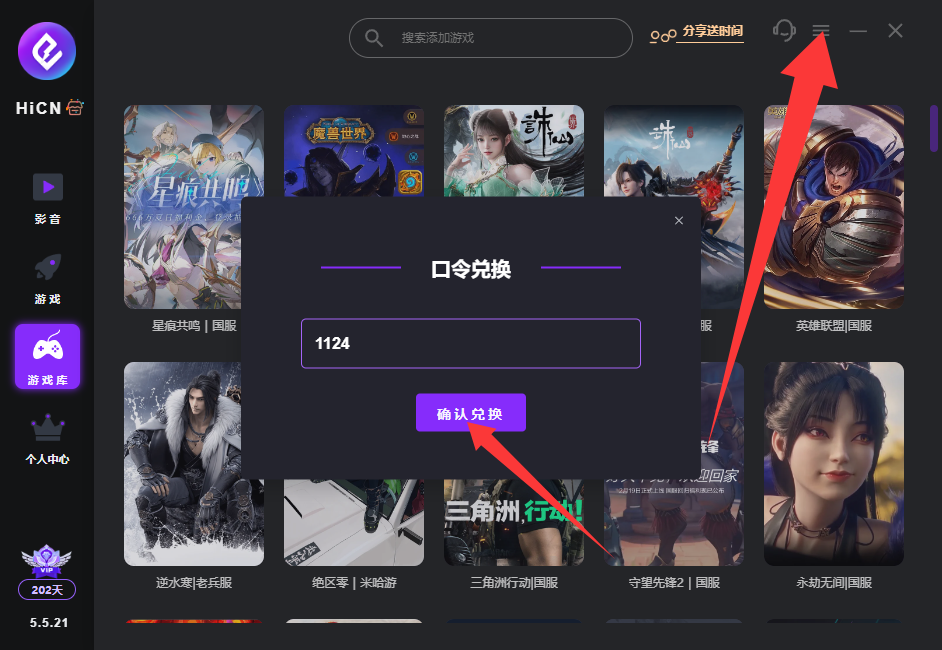
One last thing: use the code 1124 to receive free membership acceleration time.