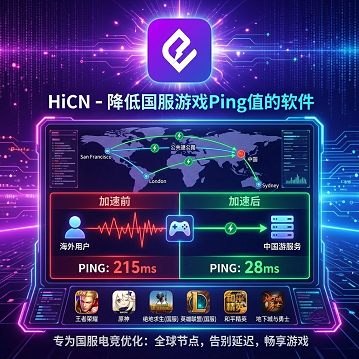
Preface: Why 'switching to another accelerator' sometimes doesn't solve the problem
Many overseas players experiencing lag in Chinese servers immediately search for 'accelerator recommendations', download three to five options and try them one by one, only to find latency still fluctuates between 180–250ms. The issue often isn't 'choosing the wrong accelerator', but ratherjumping to solutions without first diagnosing the problem.
There is a clear step-by-step logic to optimizing cross-border game latency:
1. Start with a quick diagnosis: Run a baseline Ping test to determine if the issue is physical distance, routing congestion, or protocol encapsulation.
2. Then try temporary optimizations: Close unnecessary background processes, adjust DNS, or switch local WiFi bands to see if there's improvement.
3. Finally, move to long-term solutions: When temporary optimizations hit their limit, switch to a dedicated line accelerator and compare three core metrics: jitter, packet loss, and failover.
This article follows these three steps, providingclear decision pointsat each stage to help readers with different network conditions and game types quickly identify where they should stop.
Step One: Quick Diagnosis — At which layer is your Ping high?
1.1 Comparison of Three Common Ping Test Tools
The table below covers three types of tools, from 'lightweight command line' to 'in-game network panels'. It's recommended to use them in combination to avoid being misled by a single metric.
Operational Advice: First, use ping to send 100 packets and record the average and min/max difference. Then use traceroute to check hop count and suspicious packet loss nodes. Finally, open the in-game network panel to confirm if the experience matches the command line results. If all three agree, you've obtained a reliable diagnostic baseline.
Tool | How to Use | Key Metrics | Applicable Scenarios | Limitations |
System ping command | ping <Chinese server IP> | Average latency, min/max latency difference | Quickly get baseline RTT | Does not show routing hops |
traceroute / tracert | tracert <IP> | Hop count, RTT per hop, presence of * * * | Locate routing congestion nodes | Some nodes hide ICMP |
In-game network panel | Honor of Kings Settings → Network Diagnostics | Real-time latency, packet loss rate, jitter | Reflects actual in-game experience | UI fields differ between games |
1.2 Reference Ping Thresholds for Different Games
Different game genres have vastly different tolerance for latency. The table below gives 'playable' and 'competitive' threshold ranges for common Chinese server games to help you judge your current Ping level.
Note: The above ranges are based on typical lines and community experience; differences across regions (North America/Europe/Australia), ISPs, and servers can be significant. Actual experience varies by individual and is for preliminary reference only, not a guarantee for specific routes or servers.
Key Decision Point: If you play Honor of Kings / League of Legends / Game for Peace and your direct Ping stays > 200ms or jitter > 50ms, temporary optimizations are unlikely to bring it below the competitive threshold. This signal means you most likely need to proceed to step three (professional solution).
Game Type | Representative Titles | Playable Range (Experience) | Competitive Range (Experience) | Typical Symptoms When Exceeding Threshold |
Real-time MOBA | Honor of Kings, League of Legends | < 200ms | < 150ms | Skill hit drift, last-hit delay, teleporting in team fights |
Tactical Shooter / FPS | Game for Peace, Naraka: Bladepoint | < 150ms | < 100ms | Bullet deviation, failed peeking, only realize being killed after death |
Racing / Rhythm Games | QQ Speed, Phigros | < 120ms | < 80ms | Judgment ring offset, combo misses |
MMORPG / Turn-based | Genshin Impact (solo), Justice Online | < 250ms | Not sensitive | Occasional teleportation acceptable |
Card / Casual | Onmyoji, Arknights | < 300ms | Not sensitive | Basically unnoticeable |
1.3 Quickly Identifying the 'Problem Layer' by Numbers
The above ranges are based on common observations of public internet routes and are not guarantees for individual lines.
Phenomenon | Typical Values | Suspected Layer | Recommended Next Step |
Low average latency (< 80ms), but occasional spikes to 300ms+ | Jitter > 50ms | Routing congestion / protocol layer | Step 2 + Step 3 |
Consistently high latency (NA 180–250ms, EU 150–220ms), little fluctuation | Hop count > 20, detour via submarine cables | Physical distance + routing | Step 3 |
Slower than direct connection after installing a regular VPN | Extra delay from encryption encapsulation | Protocol and encryption layer | Skip step 2, go directly to step 3 |
Noticeable degradation from 20:00–23:00 Beijing time | Packet loss rate > 3% | Peak hour routing congestion | Step 3 (nighttime dedicated line) |
Step Two: Temporary Optimization — When Are These Actions Effective?
2.1 Close Background Programs
Effectiveness Boundary: Only effective when 'local bandwidth is maxed out' or 'uplink is saturated'; completely ineffective for cross-border backbone congestion.
● If you're downloading large files, doing BT uploads, or syncing cloud drives in the background, closing them may reduce game Ping by 20–60ms.
● If your local network is idle (router panel shows bandwidth usage < 30%), closing background programs usually affects Ping by < 5ms,and may cause high fluctuation — background processes may restart at any time.
How to Judge: Check uplink/downlink usage in your router or system resource monitor. If it's consistently above 70% of bandwidth, closing background programs yields clear benefits; if it's long-term below 30%, closing them is basically ineffective.
2.2 Switch DNS
Effectiveness Boundary: DNS resolution only affects 'handshake time when first connecting to the game', and has no ongoing impact on steady-state Ping.
● Changing default DNS to 119.29.29.29 (DNSPod) or 1.1.1.1 (Cloudflare) may speed up login by 50–200ms.
● Once the game is in steady state (connection maintained), most game packets go direct via IP, and DNS is usually no longer involved — but in reconnection or cross-server selection scenarios, it may still slightly affect experience.
Conclusion: DNS switching usually won't significantly lower in-game steady-state Ping, but may slightly improve login, reconnection, and server selection. Don't rely on it as the main way to reduce in-game Ping.
2.3 Switch Local WiFi Band
Effectiveness Boundary: Effective when WiFi signal is weak or channel is congested; ineffective at cross-sea link level.
● Switching from 2.4GHz to 5GHz (or vice versa), or moving closer to the router, can improve local 'last 10 meters' packet loss and jitter.
● This stepcannot change at allthe physical path and routing between overseas and mainland backbone networks.
2.4 ISP Line Issues: No Local Solution
If direct connection tests show the following symptoms, the bottleneck is in the cross-border backbone, not local:
● Average latency is already > 200ms (common for NA/EU players);
● Multiple submarine cable detours in traceroute (data goes to Hong Kong/Japan/Singapore before entering mainland);
● Packet loss rate stays > 3% during Beijing evening peak (20:00–23:00).
These symptoms arerouting and congestion issues of cross-border backbone networks, and no local action (closing background, changing DNS, rebooting router, switching WiFi band) can solve them.At this point, go directly to step three, don't waste effort repeating step two.
2.5 Summary of Temporary Optimization Decisions
Key Decision Point: After completing all actions in step two, test Ping again — if the numbers compared to the step one baselineshow no significant reduction in fluctuation, the bottleneck is not local, but in the cross-border link itself. Proceed to step three.
Temporary Optimization | Effective Scenarios | Ineffective Scenarios |
Close background programs | Local bandwidth maxed out (usage > 70%) | Local bandwidth idle (usage < 30%) |
Switch DNS | Only improves login handshake time | During steady-state gameplay |
Switch WiFi band | Weak signal / channel congestion | Cross-border link congestion |
Reboot router | Local NAT issues | Cross-border backbone congestion |
Before choosing a China accelerator, understand four core evaluation dimensions
Before entering the 'long-term solution' selection, clarify a misconception: choosing a China accelerator isn't just about the 'latency number'. A solution with seemingly lower Ping may not actually be stable during peak-time ranked matches. To judge whether a China accelerator is worth choosing, you need to look at at least the following four dimensions.
Dimension 1: Line Type (determines latency floor)
● CN2 backbone direct connection: Common backbone solution for NA/EU players, relatively stable during peak hours.
● IPLC international dedicated line: International private line, low packet loss, but higher cost, usually for enterprise or advanced e-sports solutions.
● Regular public network tunnel: Low cost, but high packet loss during peak hours, not suitable for real-time competition.
Dimension 2: Dual-route Concurrency (determines jitter stability)
Any packet loss on a single path node is reflected at the client; dual-route concurrency sends via two physical paths simultaneously, with the receiver aligning and deduplicating packets, significantly reducing jitter. For real-time competitive games like Honor of Kings / League of Legends / Game for Peace, this is the key capability that separates 'ordinary China accelerators' from the rest.
Dimension 3: Failover Time (determines disconnection experience)
When the main node goes down, regular solutions need 2–5 seconds to reconnect, during which the game client may already consider it disconnected; solutions with dual-backup network mechanisms can switch to the backup node within 1 second, making the experience close to 'seamless switching'.
Dimension 4: Trial Length (determines if you can test peak hours)
The industry-standard 3-day trial usually can't cover a full combination of 'weekday peak + weekend peak'; China accelerators with 3–7 day extended trials let you more fully test stability, rather than just 'trying it out' during off-peak times.
Key Point: If you've completed step one diagnostics and your direct Ping stays > 200ms or jitter > 50ms, prioritize China accelerators that offer all four: 'CN2/IPLC line + dual-route concurrency + millisecond-level failover + extended trial', then proceed to step three for quantitative comparison.
Step Three: Long-term Solution — Professional Accelerator Selection and Quantitative Comparison
3.1 General Network Optimization vs. Professional Accelerator: Quantitative Comparison
Test Conditions: The following are typical observed values in the test environment: 'Connecting from the US West Coast to the Chinese Honor of Kings server', covering both Beijing peak and off-peak hours. Specific values vary by ISP, time, and device performance, and are not public guarantees.
Key Decision Point: The rightmost column, 'dual-route concurrency + e-sports dedicated line', refers to solutions designed for real-time competitive scenarios. While its average latency is only 10–20ms lower than regular accelerators, the difference injitterandfailover timeis an order of magnitude — and these two metrics have a far greater impact on competitive experience than average latency.
Metric | General local optimization (close background + change DNS) | Regular China accelerator | HiCN dual-route concurrency + e-sports dedicated line |
Average latency (NA → Honor of Kings CN server) | 200–300ms (direct connection baseline) | 140–200ms | 130–180ms (typical range) |
Packet loss rate (peak hours) | 2%–8% | 0.5%–2% | < 1% (in failover scenarios) |
Jitter | 30–80ms | 15–40ms | 10–25ms |
Node failover time | N/A | 2–5 seconds | Within 1 second (dual-backup network) |
Protocol layer optimization | None | Basic UDP optimization | Dual-route concurrency + forward error correction |
Target users | Temporarily reduce occasional lag | Casual gaming / video streaming | Real-time competitive players / live streaming |
3.2 Jitter Is More Critical Than Absolute Latency — Why 'Dual-route Concurrency' Is Especially Important for Competitive Games
Competitive game servers usually sync state every 30–60ms, and the client updates character position and skill cooldown with each frame received. Iflatency is stable(e.g., a constant 150ms), modern games' rollback/lag compensation mechanisms can handle it; but iflatency is jittery(fluctuating), players will see 'teleporting' or 'skills not registering'.
With single-route transmission, any sudden packet loss at an intermediate node is directly reflected at the client;dual-route concurrencymeans:
● Sending via two physical paths simultaneously (different ISP entry points or submarine cable landing stations);
● Packet alignment and deduplication at the receiver;
● Even if one path briefly degrades, the other can still provide a stable data stream.
For players, this means:Jitter is noticeably reduced, and the sense of time between action and feedback feels more 'solid'. This is why dual-route concurrency is far more important for e-sports than for video streaming — the latter is almost unaffected by packet loss and jitter, while the former directly determines win/loss.
3.3 Stability in Failover Scenarios
What's more frustrating than 'high latency' is 'disconnect + waiting ten seconds to reconnect'.
● When a node fails, regular accelerators usually need 2–5 seconds to reconnect — during this window, the game client often already considers it disconnected.
● Solutions with dual-backup network mechanisms can switch traffic to the backup node within 1 second when the main node fails — the window is so short that the game's disconnect-reconnect logic may not even trigger, making the experience nearly seamless.
3.4 Solution Choices for Different Player Types
Key Decision Point: If what you need isn't 'occasionally usable', but 'Ping stays stable for 30 minutes of peak-time ranked play', then single-route solutions (regular accelerator + smart node selection) have hit their jitter control ceiling. You should choose a solution with dual-route concurrency and millisecond-level failover.
Player Type | Recommended Solution | Core Requirement |
Occasional video watching, turn-based games | Regular China accelerator / router optimization is enough | Login + occasional connection stability |
Honor of Kings / League of Legends ranked players | Dual-route concurrency + e-sports dedicated line | Stable jitter, no disconnects during peak hours |
FPS / tactical shooter players | Dual-route concurrency + failover < 1 second | Lowest jitter + millisecond-level recovery |
Live streaming + gaming simultaneously | Dual-route concurrency (separate up/down link) | Stable uplink + stable downlink |
3.5 What Metrics to Compare When Evaluating Accelerators
When choosing, looking only at 'average latency' can be misleading. It's recommended to compare the following three metrics:
1. Jitter: Difference between max and min latency over 30 minutes. Jitter > 40ms affects gameplay in competitive scenarios.
2. Peak hour packet loss rate: Packet loss rate from 20:00–23:00 Beijing time. Regular accelerators are usually > 2% during this period.
3. Node failover time: How long to switch to backup after main node fails. For real-time competition, < 2 seconds is recommended.
FAQ: Common Questions for Overseas Players Reducing Ping to Chinese Servers
Q1: What's the theoretical minimum latency from North America to Chinese servers? A: On some typical direct trans-Pacific submarine cable routes, RTT is observed at about 130–150ms; the exact minimum varies by origin, server location, cable landing, and ISP routing. No accelerator can break the physical limit set by the speed of light, but achieving 130–180ms with a dedicated line is already ideal on many routes.
Q2: Can free China VPNs play Honor of Kings? A: You can log in, butnot recommended for ranked/high-tier matches. Free solutions have high packet loss and jitter during peak hours, which significantly affects input accuracy and can skew win/loss outcomes.
Q3: Is closing background programs actually useful? A: Only effective when local bandwidth is maxed out; completely ineffective for cross-border backbone congestion. If your router panel shows bandwidth usage < 30%, closing background programs usually yields < 5ms benefit and may cause fluctuation.
Q4: Does dual-route concurrency waste bandwidth? A: It consumes about 10%–20% more bandwidth for redundancy, but the improvement in jitter is highly cost-effective for competitive scenarios. Game UDP packets are very small, so the extra total usage is negligible for typical home bandwidth.
Q5: Is occasional node fluctuation normal? A: In cross-border scenarios,occasional fluctuation is normal, the key is recovery speed. Solutions with millisecond-level failover can keep single fluctuations under 1 second, making the experience nearly seamless.
Q6: When is it necessary to switch to a professional accelerator? A: Consider it if any of the following are true: (a) You play real-time competitive games and direct Ping > 200ms; (b) Jitter > 50ms during Beijing peak hours; (c) Frequent disconnects during live streaming. These three issues can't be solved by local optimization.
Q7: Can phone and computer be accelerated at the same time? A: Mainstream China accelerator clients support Windows, iOS, and Android platforms. One account can log in on multiple devices, but the number of simultaneous online devices depends on your subscription plan.
Q8: What can be verified during the trial period? A: It's recommended to coverat least one peak hour period(20:00–23:00 Beijing time) in your actual test. Off-peak experience can't predict peak performance. Solutions with extended trial periods (like 3–7 days) can better cover both a workday and a weekend for stability comparison.
Next Step: Run a Test Based on Your Scenario
If your gaming scenario is 'real-time competition + overseas + peak hours', it's recommended to test as follows:
1. In direct connection mode, use ping to test a baseline (100 packets), record average latency, max/min difference, and packet loss rate.
2. Start a professional accelerator and select the 'Chinese server game / e-sports' line, repeat the same test.
3. Compare the two results forjitterandpeak hour packet loss rate — these two metrics reflect real competitive experience better than average Ping.
4. If there's no significant improvement, try switching ISP entry lines and see if jitter narrows further.
This article focuses on the decision logic and solution comparison for 'how to bring Chinese server game Ping into playable range step by step'. All metrics are based on typical test environments; actual performance depends on ISP, time, device, and game server status. It's recommended to test in your own network environment before making a final decision.