
Many overseas players encounter a typical situation when playing the Chinese server version of "Lord of the Mysteries" for the first time:
It plays fine during the day, but suddenly starts lagging at night.
Even though the dormitory broadband speed is fast and watching videos or browsing the web works perfectly, entering the game is a completely different story—character movement occasionally stutters, skills don't respond immediately when pressed, scene transitions require waiting, and in severe cases, the latency numbers jump up suddenly.
What's even more frustrating is that this lag isn't necessarily constant.
Sometimes it's very smooth for over ten minutes, but just as you're about to play seriously, a wave of network instability hits.
For Chinese people and international students in North America, Europe, Australia, Japan, South Korea, and Southeast Asia, this is actually a common network phenomenon when playing Chinese server games.
The problem may not be the computer configuration, but ratherthe quality of the network connection between overseas locations and the Chinese game servers.

Playing "Lord of the Mysteries" from overseas: fast internet speed does not equal low game latency
Many players judge whether a network is good or not by running a speed test as their first reaction.
A download speed of 300Mbps, 500Mbps, or even gigabit broadband looks very fast.
But after actually entering "Lord of the Mysteries", the Ping value may still be on the high side.
The reason is:
Download speed and game latency are two different concepts.
For example, when downloading files from local servers while overseas, the data transmission distance is relatively short, making it easy to achieve high speeds.
However, when connecting to the Chinese server of "Lord of the Mysteries", game data needs to be transmitted from the overseas network to the domestic server, and then the server data must be returned to the player's device.
Therefore, even if the broadband speed in your overseas dormitory or home is fast, it does not mean that the connection to the Chinese server game will be smooth.
An easily overlooked issue: the network might be "taking a detour"
When overseas players connect to domestic servers, data does not necessarily travel along the most ideal route.
Some routes pass through many network nodes, and there may even be obvious detours.
It's like going from your dormitory to school.
The normal route might only take 20 minutes, but if the road is congested and you have to take a few extra turns, the time to reach the destination will still increase, no matter how fast the car is.
The same principle applies to playing Chinese server games from overseas.
Especially during peak network usage hours at night, after the route pressure increases, "Lord of the Mysteries" may experience:
Sudden latency spikes → Ping values jumping back and forth → Delayed operation feedback → Occasional stuttering.
Therefore, what overseas players really need to optimize is often not "how fast the broadband is", butwhether the data transmission route to the Chinese server is stable.
So, how can you optimize playing "Lord of the Mysteries" from overseas?
If lag only occurs occasionally, you can first check your local network.
For example, reconnect to Wi-Fi, close background download tasks, pause cloud drive synchronization, or restart the game.
But if you find that you have similar problems every day when playing "Lord of the Mysteries", and other overseas friends often encounter them too, then the route connecting overseas to the Chinese server is worth more attention.
This is why many overseas players who have been playing Chinese server games for a long time usea return-to-China accelerator.
A return-to-China accelerator mainly optimizes the network route when connecting from overseas to domestic servers.
Simply put:
Overseas device → Network acceleration route → Domestic game server
By choosing a more suitable route, you can reduce unnecessary network detours and fluctuations, thereby improving the connection experience for Chinese server games.
Playing "Lord of the Mysteries" from overseas? Try HiCN return-to-China accelerator
If you are overseas and mainly play "Lord of the Mysteries" and other Chinese server games, you can use HiCN return-to-China acceleratorfor network optimization.
It is well-suited for overseas Chinese, international students, and people living abroad long-term who frequently use domestic gaming and audio-visual services.
Currently, HiCN supports:
Windows, iOS, Android, and routers.
This is more convenient for players with multiple devices.
For example, playing "Lord of the Mysteries" on a Windows PC during the day, using your phone to play other Chinese server games after going out, and wanting to listen to Chinese music or watch domestic TV shows when returning to the dormitory at night—you don't need to frequently switch between different network optimization tools.
In addition to game acceleration, it can also cover daily usage scenarios like listening to music and binge-watching shows.
How "Lord of the Mysteries" players can use HiCN
The whole process can be divided into three stages.
Stage 1: Before starting the game
First, install HiCN according to your device.
PC players use the Windows version, and mobile players choose iOS or Android based on their system.
If you have multiple devices in your dormitory, apartment, or home that need long-term network optimization, you can also use the router method based on your actual situation.
After opening HiCN, enter the code 1124 to redeem membership for free. Select an acceleration route suitable for Chinese server games and enable network optimization.
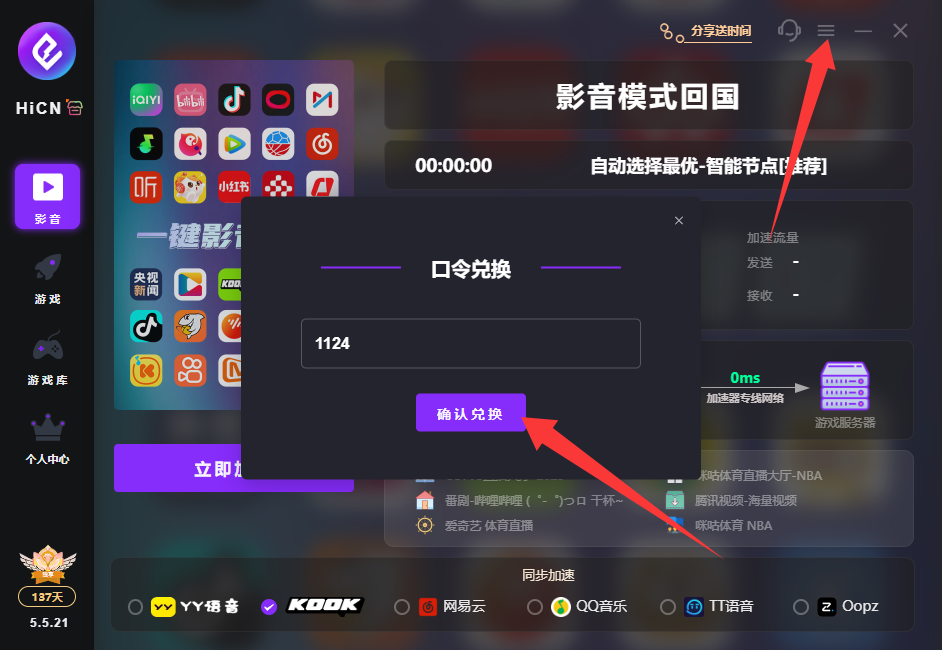
It is recommended to launch "Lord of the Mysteries" after the connection is established.
Stage 2: Entering the game for testing
Don't just look at the latency numbers displayed by the client.
What you really need to observe isthe actual experience in the game.
You can play for a while and focus on the following aspects:
Whether character movement still stutters suddenly;
Whether skill operation feedback is more timely;
Whether scene loading is stable;
Whether the Ping value jumps up and down frequently;
Whether it is still easy to experience obvious lag during peak hours at night.
It is especially recommended to test during the time you usually play the game most often.
If you only have time to play after 9 PM every night, try to test at night instead of only testing during the day when the network is idle.
The results obtained this way have more reference value.
Why do players in different regions have different actual latency?
This is a point worth noting when choosing a return-to-China accelerator.
Suppose two people are playing "Lord of the Mysteries" from overseas, one in Singapore and one in the United States; the latency results obtained by the two will likely be completely different.
Even in the same city, using different network operators may result in differences in actual performance.
Therefore, there is no need to over-obsess about a specific Ping number tested by someone else.
What really has reference value is:
Your own region + the network you use + the time period you usually play.
This is why it is recommended to experience it for yourself.
HiCN provides newcomers with a 3-7 day free trial, so you can test "Lord of the Mysteries" in your own real network environment first.
If you still experience occasional lag after enabling game acceleration, you can continue to troubleshoot like this:
Using a return-to-China accelerator solves network optimization issues at the route level, but the local network environment is equally important.
For example, if you live in a student apartment where dozens of people use the same network at night, even if you have accelerated the game, the local Wi-Fi congestion itself may affect the final experience.
In this case, you can try:
Switching from Wi-Fi to an Ethernet cable.
If conditions permit, PC players can connect directly via Ethernet cable to reduce wireless network interference.
Closing background downloads.
Game updates, system updates, cloud drive synchronization, and other large download tasks can all consume network resources.
Changing the Wi-Fi frequency band.
When you are close to the router, you can try using 5GHz Wi-Fi.
Reconnecting the acceleration route.
If the current status of a certain route is not ideal, you can reconnect or select another suitable route to test.
Restarting the game client.
After adjusting the network route, it is recommended to restart "Lord of the Mysteries" to let the game re-establish the network connection.
What overseas players really need to pay attention to is not "lowest latency", but stability
Many players look at only one indicator when choosing a game acceleration tool:
who shows the lowest latency.
But for actual gaming, stability is equally important.
For example:
One network maintains a relatively stable latency range for a long time;
Another network may have very low latency occasionally, but then suddenly rise significantly after a while, and then drop again.
In the long run, the former usually provides a more comfortable experience.
Especially since "Lord of the Mysteries" requires a continuous connection, frequent network fluctuations affect the gaming experience more than just having slightly higher latency.
Therefore, when testing HiCN, overseas players can play for a few consecutive rounds or run it for a period of time, rather than just opening the game, looking at the Ping value, and ending the test.
Which overseas users is HiCN more suitable for?
If you only play Chinese server games occasionally, basic network adjustments might be enough.
But if you fall into the following situations, using a return-to-China accelerator will be more convenient:
You are overseas, but play Chinese server games long-term.
For example, besides "Lord of the Mysteries", you also play Honor of Kings, League of Legends, Delta Force, and other Chinese server games.
You often team up with friends in China.
If your friends in China have a normal network but you experience frequent lag because you are overseas, it will directly affect the team-up experience.
Besides gaming, you also have audio-visual needs.
Many international students not only play games but also listen to Chinese music, watch domestic videos, or binge-watch shows.
HiCN supports various network optimization scenarios such as gaming and audio-visual, so you don't need to switch tools frequently for different needs.
You have usage needs for both computers and mobile phones.
HiCN supports Windows, iOS, Android, and routers, which is relatively convenient for overseas users who own multiple devices.