Why are so many people starting to play "Honor of Kings: Chess" recently?
"Honor of Kings: Chess" is a strategy game derived from the Honor of Kings IP, but it is not simply a repackaging of traditional auto-chess games.
Based on the gameplay introductions released so far, it emphasizes the growth rhythm of "refreshing cards, raising heroes, and unleashing high-power skill effects." Players gradually build their lineup by constantly refreshing, purchasing, and cultivating heroes. Once heroes reach a certain stage, their skill performance and battlefield impact are significantly enhanced.
For players already familiar with "Honor of Kings" heroes, the learning curve is not as steep as one might imagine.
Many heroes, factions, and skills feel familiar. Coupled with features like lineup recommendations and in-game tips, it is easy to gradually grasp the strategy even if you are new to this genre. Many in the player community have mentioned that the game feels like "there are many rules, but it's not that exhausting to play."
Official information also shows that the game currently supports PC, iOS, Android, and HarmonyOS, with cross-platform play between WeChat and QQ, and full data synchronization across all platforms. This is quite convenient for international students and those living abroad: you can play on your computer, switch to your phone when you go out, and you don't have to worry about managing your game progress separately.
The problem lies right here.
The game is installed, the account is ready, but once you actually start playing, some overseas players first encounter issues not with their lineup, but with the network.
When playing "Honor of Kings: Chess" abroad, the most annoying thing is not just "high Ping."
When many people see poor network performance, their first reaction is to look at the latency numbers.
But for a game like "Honor of Kings: Chess," network issues are sometimes not that intuitive.
For example, you might encounter these situations:
The login page keeps spinning.
The game has started normally and the account is fine, but it gets stuck at the connection stage for a long time. Sometimes restarting works, other times you have to switch networks to recover.
Entering matches slower than others.
Especially in overseas dorms, apartments, or public Wi-Fi, web pages might seem normal, but it slows down significantly as soon as the game starts loading.
Occasional delays in shop refreshes or action feedback.
Strategy games don't require high-frequency inputs every second like shooters, so poor network performance might not manifest as constant stuttering, but rather as certain actions suddenly being half a beat slower.
The network is worse at night than during the day.
It works fine during the day, but at night, the latency starts fluctuating. Sometimes it's not that the latency is extremely high, but that it jumps up and down, which is often more frustrating to experience.
Sudden disconnection during critical rounds.
Just as your lineup is formed and you've finally raised your core hero, the network fluctuates, and by the time you reconnect, the situation has already changed.
In recent public content related to overseas players, "can't log in," "infinite spinning," "server connection failed," "network instability," "disconnects," and "high Ping" are recurring issues.
Therefore, don't just stare at a single latency number when solving problems.
Why is it easy to encounter these situations when playing the Chinese server from abroad?
The reason is actually quite easy to understand.
You are abroad, the game servers are mainly in China, and game data needs to travel through a longer network path.
The physical distance is there, so the connection process naturally has to pass through more network nodes.
If the route is clear, it might just be a slightly higher base latency; but if there is congestion in any segment in the middle, the problem will slowly evolve from "slightly higher latency" to ping spikes, slow loading, or even short-term disconnections.
Especially in the following scenarios, it is easy to amplify the problem.
1. The local overseas Wi-Fi itself is unstable
Shared networks in student dorms and apartments are a typical situation.
You might not notice anything while browsing the web or chatting, but once everyone starts watching videos, playing games, or downloading files at night, wireless network congestion occurs.
Especially if the device is far from the router, separated by several walls, or connected to 2.4GHz Wi-Fi, network fluctuations in games are usually more obvious.
If you can connect to 5GHz or Wi-Fi 6, try that first.
2. Too far from the domestic server
Regions like Singapore, Japan, and South Korea are usually relatively close; when you are in Europe, the Americas, or Australia, the cross-regional transmission distance increases significantly.
In this case, just switching to a faster local broadband plan won't necessarily solve all the problems.
Because your broadband download speed might be fast, but "fast download speed" and "stable connection to the Chinese server" are not the same thing.
3. Peak hour network congestion
Some players will notice a strange phenomenon:
It plays fine in the afternoon, but suddenly starts lagging at night.
The device hasn't changed, and the game settings haven't been touched.
This situation is likely related to the congestion level of the current network path. Especially in shared network environments, when local networks and cross-regional lines are busy at the same time, network fluctuations are more likely to occur.
4. Background programs secretly hogging the network
This problem is easily overlooked.
Background updates on computers, cloud drive synchronization, system downloads, and even mobile photo backups can all consume network resources.
If you find that "Honor of Kings: Chess" suddenly becomes unstable, don't rush to reinstall the game.
Check if Steam, system updates, cloud drives, or other download programs are running in the background; sometimes closing them makes things much better immediately.
Why consider HiCN return-to-China accelerator when playing "Honor of Kings: Chess" abroad?
If you have confirmed that there is no obvious problem with your home's basic network, but connecting to the "Honor of Kings: Chess" Chinese server still often results in high latency or network fluctuations, then you can start with the connection path itself.
A strategy suitable for overseas Chinese and international students here is to use HiCN return-to-China accelerator.
It mainly optimizes routes for scenarios where overseas users connect to domestic networks.
Simply put, you don't need to study complex network paths yourself; you just need to select the corresponding game or a suitable route, and let the game data be transmitted through an optimized connection path.
For a game like "Honor of Kings: Chess" that requires a continuous online connection, what is truly worth paying attention to is not just lowering the Ping at a certain moment, but:
Can it reduce ping spikes?
Can it maintain stability during long matches?
Can logging in and loading be smoother?
Can it reduce obvious fluctuations during peak hours at night?
These indicators are often more practical than chasing a particularly impressive instantaneous number.

How to use HiCN to play "Honor of Kings: Chess"?
There is no need to make the operation overly complicated.
PC players
First, install "Honor of Kings: Chess" normally, then open HiCN.
Find a suitable Chinese server game network optimization route in the game-related routes, and after a successful connection, launch the game.
If the performance of the first selected route is average, you can test other available routes.
Don't just test for a few dozen seconds.
It is best to play one or two full games to see the latency fluctuations, login speed, and mid-game connection status before deciding which route is more suitable for you.
iPhone and Android players
The approach for mobile is the same.
First open HiCN to complete network acceleration, then launch "Honor of Kings: Chess."
If you usually play in a dorm or at home, it is recommended to compare:
Wi-Fi + HiCN
and
Mobile data + HiCN
to see which one is more stable.
Often, such a comparison can determine whether the problem lies in the local Wi-Fi or the cross-regional connection route.
Multi-device players can consider a router
Some people have more than one device at home.
Playing "Honor of Kings: Chess" on a computer, browsing domestic apps on a phone, and watching videos on a tablet—it's quite troublesome if you have to handle the network for each device separately.
HiCN supports Windows, iOS, Android, and routerssimultaneously.
For those living abroad long-term who have domestic network needs for multiple devices at home, setting up network optimization on the router side will be much more convenient.
Don't just turn on acceleration; do these small checks first
Network optimization tools are not a magic switch; if the local environment itself is too poor, it will still affect the experience.
Therefore, before or after using HiCN, I suggest doing a few simple checks.
Get closer to the router.
If you are separated by two rooms or even a floor, solve the wireless signal problem first.
Prioritize using 5GHz Wi-Fi.
When the distance is appropriate, it is generally more suitable for gaming than the crowded 2.4GHz network.
If possible, use a wired connection for PC.
This is the simplest and most easily overlooked method.
Turn off background downloads.
Especially large game updates and cloud drive synchronization.
Retest after changing routes.
The suitable routes for different regions are not necessarily the same.
Players in Los Angeles, Singapore, London, and Sydney do not need to force themselves to use the same route.
Use whichever is actually stable.
How to determine if it is really a network problem?
You can use a very simple "elimination method."
Enter "Honor of Kings: Chess" directly with your original network, play one or two games, and record whether there is slow login, ping spikes, network fluctuations, or reconnections.
Then connect to HiCN and play a few more games in the same network environment.
Don't just compare the lowest latency, but focus on three things:
Has the average latency decreased?
Have the latency fluctuations become smaller?
Is the long-term connection more stable?
If there are improvements in all three aspects, you can basically judge that the problem mainly comes from the cross-regional connection path.
If it is equally laggy in both cases, you should continue to check your Wi-Fi, router, or local network.
This troubleshooting is much more effective than constantly restarting the game.
Not just for games, you can also use it for listening to music and watching shows abroad
Many international students actually have this situation:
They initially looked for a return-to-China accelerator for gaming, but later found that they also needed to listen to domestic music, watch videos, follow variety shows, and watch live streams.
If you need to access domestic network services every day, it is indeed tiring to deal with each application separately.
The usage scenarios for HiCN are not limited to "Honor of Kings: Chess."
For overseas Chinese and international students, you can choose the corresponding network optimization method according to your equipment and needs for playing Chinese server games, listening to music, watching shows, or using other domestic network services.
Windows computers, iPhones, Android phones, and routers are all covered, making it easier for those with many devices at home.
Final thoughts
"Honor of Kings: Chess" is the kind of game that "feels complicated when watching others play, but is easy to get hooked on after playing a few rounds yourself."
Refreshing cards, raising heroes, and watching the lineup take shape is inherently a very important part of the fun.
But after being abroad, the experience often adds a layer of network variables.
If it only lags occasionally, you can check your Wi-Fi, background programs, and local network first; if there are long-term issues like slow login, high Ping, latency fluctuations, or mid-game disconnections, it is more suitable to start with cross-regional route optimization.
For overseas Chinese and international students who frequently play Chinese server games like "Honor of Kings: Chess" and also have needs for listening to domestic music and watching shows, HiCN return-to-China accelerator can be a relatively hassle-free network optimization solution.
New users can first experience 3—7 days of free trial, and actually see the route performance in your area before deciding whether to continue using it.
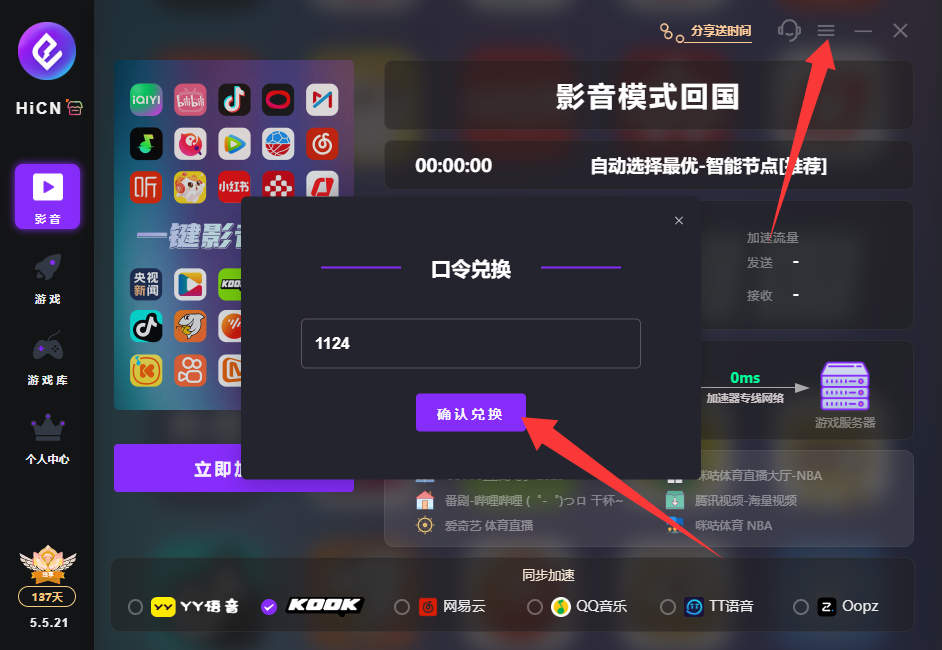
Code 1124 can be used to receive free membership acceleration time.