
For overseas Chinese and international students, playing the China server of Delta Force with friends back home has become a part of their daily entertainment. However, shooter games have high requirements for network response. When connecting to the China server from abroad, any increase in latency or network fluctuations can directly affect aiming, shooting, movement, and coordination with teammates.
Especially during close-quarters combat, rapid repositioning, looting, or extraction phases, network fluctuations lasting even a few seconds or less can disrupt an otherwise smooth gameplay rhythm.
So, what should you do if you experience high latency while playing the Delta Force China server from abroad? In addition to checking your local Wi-Fi and background network usage, you can use the HiCN accelerator to optimize your network route to the China server.
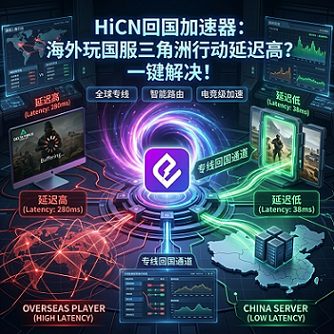
Why is it easy to experience high latency when playing Delta Force from abroad?
Delta Force involves a large amount of real-time operations such as shooting, movement, looting, tactical coordination, and multiplayer online interaction, requiring significantly higher network stability than general web browsing or video streaming.
When overseas players connect to China server, data travels a longer distance and passes through more network nodes. If any segment of the route experiences congestion or fluctuations, it may manifest as in-game latency.
Common situations include:
● Slow speed when entering the game lobby;
● Sudden spikes in latency during matches;
● Occasional character position rubber-banding;
● Delayed feedback when aiming and shooting;
● Brief pauses when picking up items;
● Desynchronization when playing in a squad;
● Occasional stuttering in voice communication;
● More noticeable fluctuations during evenings or weekends;
● Sudden lag after playing for a while.
Therefore, even if your local broadband speed test looks good, it does not guarantee a stable connection to the Delta Force China server.
Which scenarios in Delta Force test your network the most?
As a multiplayer tactical shooter, what truly tests your connection status is not the game lobby, but the high-intensity actions after entering a match.
Game Scenario | Performance during network fluctuations | Focus Area |
Close-quarters combat | Delayed shooting and feedback | Operation response |
Rapid movement | Occasional character position jumping | Latency stability |
Looting | Delayed pickup feedback | Data synchronization |
Multiplayer squad | Slow teammate position updates | Connection stability |
Driving or rotating | Brief stuttering in movement | Continuous connection |
Extraction phase | Slow response to critical actions | High-load performance |
Team voice chat | Intermittent or delayed audio | Network continuity |
Therefore, when choosing a Delta Force China server accelerator, don't just look at the latency number at a single moment; look at the stability throughout the entire match.
How to handle high latency when playing Delta Force from abroad?
If you experience game lag, you can follow these steps to troubleshoot.
Check local Wi-Fi status
If you are using a wireless network, being too far from the router or having multiple walls in between can affect connection quality.
It is recommended to stay as close to the router as possible while gaming. Windows PC players can also use a more stable wired connection if conditions permit.
Pause large download tasks
Downloading files on your computer, syncing photos on your phone, or streaming high-definition videos on other devices can consume home network resources.
Before entering Delta Force, you can pause unnecessary downloads and sync tasks.
Clear background network programs
System updates, game updates, cloud syncing, and other background programs continuously consume network bandwidth. Shooter games are sensitive to short-term network fluctuations, so reducing background network tasks before starting the game is recommended.
Restart the router
If the router has been running for a long time, try restarting the network equipment and then test the game status again.
Use a return-to-China accelerator to optimize the route
If your local network is normal but you still experience frequent latency spikes after entering the Delta Force China server, you can use a return-to-China accelerator to optimize your game route.
For overseas players, this is usually more direct than repeatedly adjusting game graphics settings, as graphics mainly affect device performance, while network latency is more related to the connection route.
How should you choose a Delta Force China server accelerator?
Shooter games have clear requirements for route stability. Therefore, when choosing a game accelerator, you can focus on comparing the following items.
Selection Criteria | Recommended Focus |
China server support | Whether it provides specific game acceleration projects |
Route stability | Whether latency fluctuates frequently |
Node selection | Whether you can switch between different routes |
Peak performance | Whether it is stable during evenings and weekends |
Multi-device compatibility | Whether it supports both PC and mobile |
Operation method | Whether it can quickly search and launch the game |
Multi-scenario support | Whether it can also be used for music and streaming |
New user trial | Whether you can test the route in your region first |
For real-time shooters like Delta Force, stability is often more important than an occasionally low latency number.
If a route doesn't show the lowest latency but remains stable throughout the match, the actual experience might be better.
Use HiCN accelerator to play Delta Force from abroad
HiCN accelerator is primarily aimed at overseas Chinese, international students, and long-term overseas residents, and can be used for network acceleration for China server games, domestic music, and video applications.
When playing the Delta Force China server, you can search for the game in the HiCN client, select a suitable route to start acceleration, and then enter the game to test the actual performance.
By optimizing the data transmission route between your overseas device and the China server, you can improve issues like high latency, network fluctuations, and unstable multiplayer connections common in standard network environments.
For overseas players who frequently play China server games, this method also saves the trouble of repeatedly adjusting complex network parameters.
HiCN supports Windows, iOS, and Android
Different Delta Force players use different devices.
Some use Windows PCs in dorms for long gaming sessions, some use mobile phones, and others switch between computers and mobile devices.
HiCN supports:
● Windows PCs;
● iPhone and iPad;
● Android phones and tablets;
● Router acceleration solutions.
Users can install the corresponding version based on their commonly used devices.
Consider router acceleration for multiple devices
If you only have one computer or phone at home, installing the client directly is usually more convenient.
However, for shared student housing or overseas households, there may be multiple devices like computers, phones, tablets, and TVs simultaneously. In this case, you can consider the HiCN router solution.
User Type | Recommended Method |
Mainly use PC for gaming | Windows client |
Mainly use iPhone or iPad | iOS client |
Android mobile gamer | Android client |
Frequently switch between phone and PC | Install corresponding clients separately |
Multiple devices at home | Router solution |
Gaming plus streaming needs | Multi-device or router solution |
Frequently on the go | Mobile client |
For fixed residences with multiple devices, the router solution can reduce the steps of repeating operations on each device.
Not just for gaming, use it for music and streaming too
Many overseas Chinese and international students not only play Delta Force but also have the habit of listening to domestic music and watching TV shows, variety shows, and videos.
HiCN allows you to switch between corresponding network acceleration projects for different entertainment applications.
For example, you can squad up with friends back home for Delta Force in the evening, and switch to music or video scenarios after the game, without needing to install multiple tools for different needs.
This is one of the reasons why multi-scenario return-to-China accelerators are well-suited for overseas users.
Basic steps to accelerate Delta Force with HiCN
The process can be divided into a few simple steps.
Step 1: Install the corresponding client
Install the Windows, iOS, or Android version based on your current device. If you want multiple devices at home to use it, you can also choose the router solution.
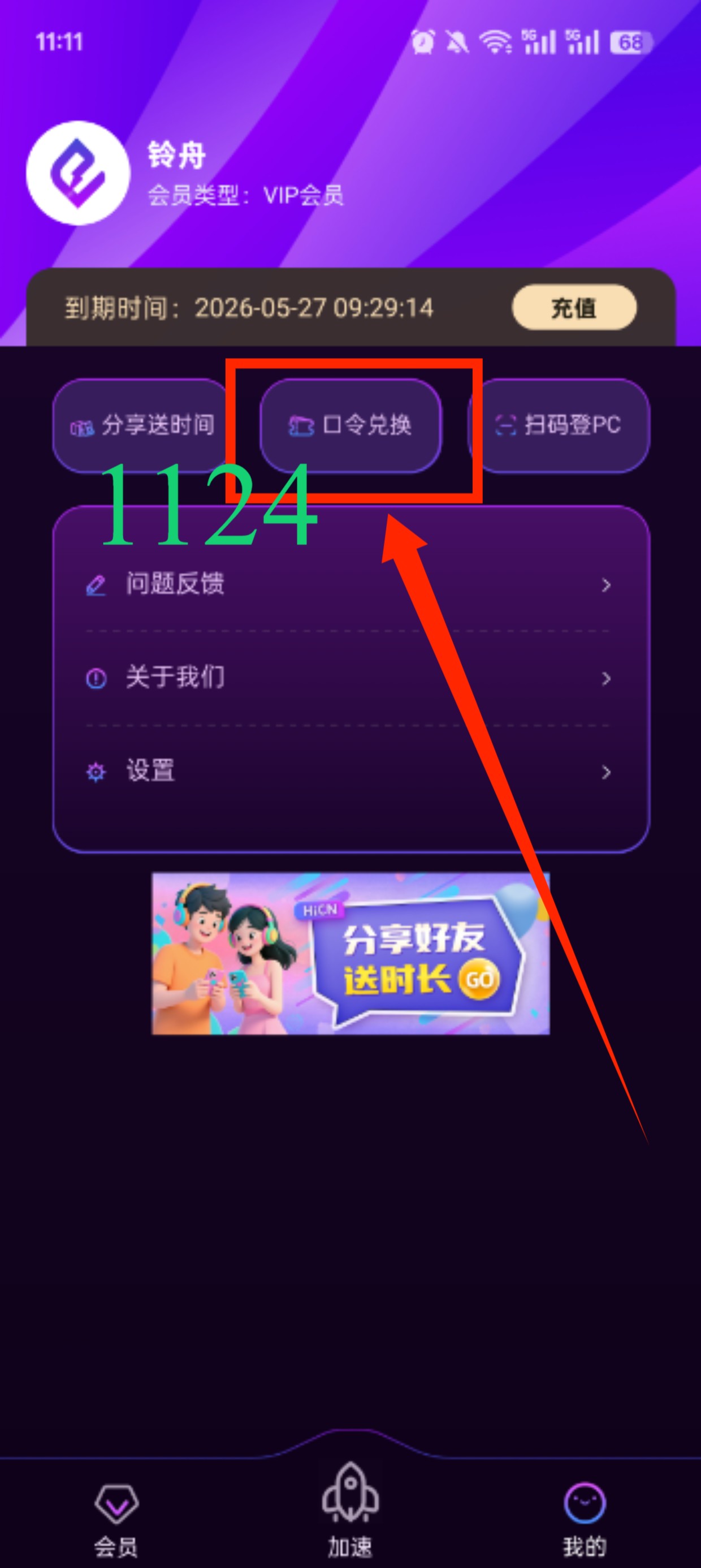
Step 2: Log in to your account and enter code 1124 to claim time.
Open the HiCN client and log in. New users can use the trial time to test the local network effect first.
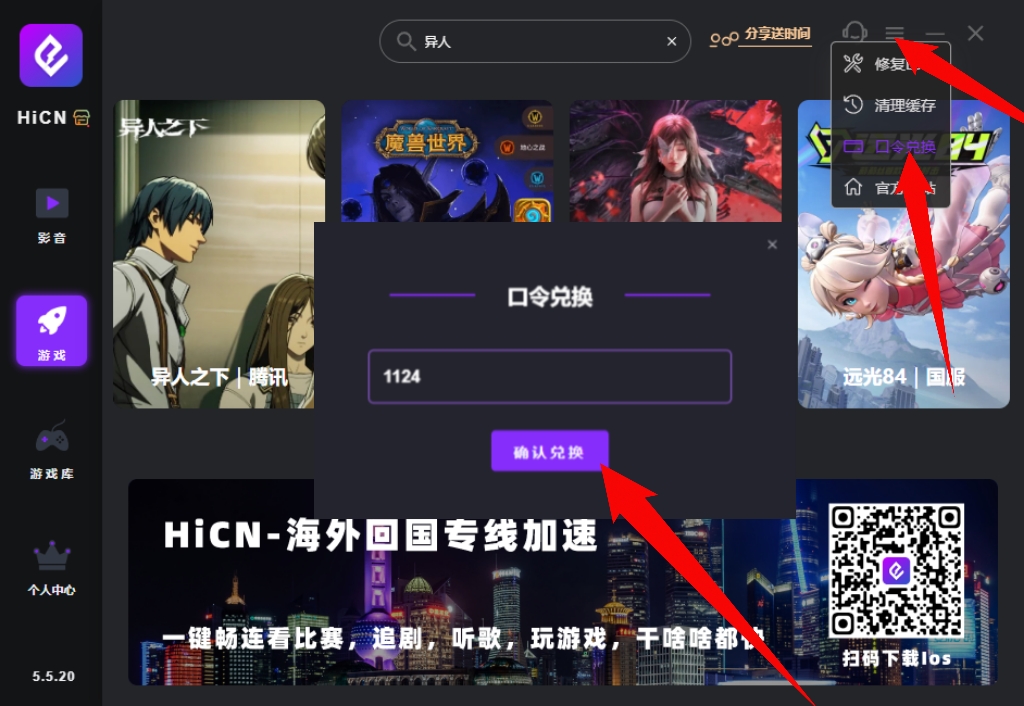
Step 3: Search for Delta Force
Enter the game acceleration page and find the Delta Force China server project in the search box.
Step 4: Select a route
Prioritize the routes recommended by the client. If there are noticeable fluctuations during the game, try switching to other nodes and test again.
Step 5: Start the game after enabling acceleration
It is recommended to start HiCN first, wait for the connection status to be normal, and then launch Delta Force.
If the game is already running, you can exit completely and reopen it so that the new game connection uses the currently selected route.
How to judge if Delta Force acceleration is effective?
For shooter games, the most effective testing method is not to stare at the latency number, but to enter a real match.
It is recommended to observe a few key scenarios:
Aiming and shooting
Observe whether the operation and game feedback are consistent during rapid aiming and continuous shooting.
Rapid movement
Check if character positioning is stable during running, turning, and moving through complex terrain.
Searching and looting
Observe whether interaction responses are timely when continuously searching and picking up items.
Multiplayer squad
When playing with friends back home, focus on checking teammate movement, combat status, and voice communication.
Long-term gaming
After completing multiple matches in a row, observe if the route is prone to significant fluctuations midway.
A route that truly suits you should remain relatively stable across most game scenarios, not just perform well when the game is first launched.
What should new users focus on during the free trial?
HiCN supports a 3 to 7-day free trial for new users. Since every overseas player's region, ISP, and home network environment are different, it is recommended to make full use of the trial time to test at different times of the day.
You can focus on comparing:
Test Method | Observation Focus |
Daytime gaming | Basic route performance |
Evening gaming | Stability during peak hours |
Multiplayer squad | Teammate synchronization |
Multiple consecutive matches | Long-term network fluctuations |
Switching nodes | Differences between routes |
Windows vs. Mobile | Usage experience on different devices |
Music and streaming | Multi-scenario acceleration effect |
The results obtained this way are more valuable for reference than just running it for a few minutes.
Summary
High latency when playing Delta Force China server from abroad is usually related to cross-regional network transmission, local Wi-Fi quality, route congestion, and background program usage.
If your local network status is normal but you still experience high latency, slow shooting feedback, or unstable multiplayer synchronization after entering the game, you can use the HiCN accelerator to optimize the route to the China server.
HiCN supports Windows, iOS, Android, and routers. It is not only suitable for China server games like Delta Force but also meets the daily needs of overseas Chinese and international students for listening to domestic music, watching TV shows, and variety shows. New users get a 3 to 7-day free trial, so you can test it based on your actual region, network, and devices.
Enter code 1124 to claim free HiCN membership acceleration time.