What are the most common issues encountered when using Bilibili after moving abroad?
For many overseas Chinese and international students, Bilibili is more than just an entertainment platform.
Some use it for:
● Studying professional courses;
● Checking Chinese tutorials;
● Following favorite content creators (UPs);
● Watching program content;
● Listening to music and live streams.
However, after leaving the domestic network environment, some users find that their user experience changes.
Common situations include:
Usage Scenario | Potential Issues |
Opening the homepage | Changes in content loading speed |
Playing videos | Increased buffering time |
HD viewing | Unstable video quality |
Long-term viewing | Occasional stuttering |
Evening usage | Degraded experience |
Mobile viewing | Mobile network fluctuations |
These situations do not necessarily mean your device performance is insufficient; they are more often related to the network connection environment.
Why is the experience of watching domestic content different when abroad?
Many users wonder:
"My overseas broadband speed isn't slow, so why is the experience with domestic apps still different?"
The reason is:
Network speed is only one factor.
Factors affecting the experience of domestic apps also include:
● Data transmission distance;
● Network connection path;
● Current line status;
● Local ISP environment;
● Network load during peak hours.
For example:
Accessing local overseas websites:
Device → Nearby server
While accessing domestic apps:
Device → Cross-regional network connection → Domestic service
There are differences in the data transmission process between the two.
Therefore, for overseas users, the key to improving the experience of domestic apps is usually not just increasing broadband speed, but optimizing the connection method.
How can overseas users determine if it is a network connection issue?
When encountering playback anomalies, you can perform a simple assessment first.
Case 1: All websites are slow
Likely related to:
● Local broadband;
● Router;
● Wi-Fi environment.
It is recommended to check your home network first.
It is recommended to check your home network first.
Case 2: Overseas websites are normal, but domestic apps are slow
For example:
Foreign video websites are smooth;
But the experience with domestic video and music apps has declined.
This situation is more likely related to cross-regional connections.
Case 3: Performance varies at different times
For example:
Normal usage during the day;
Significantly slower at night.
This usually indicates that network peak hours are having an impact.
You can quickly judge using the following table:
Performance | Possible Cause | Priority Action |
All apps are slow | Local network issue | Check device and broadband |
Domestic apps are slow | Connection line issue | Network optimization |
Slower at night | Peak hour pressure | Adjust usage habits |
Mobile is significantly slow | Mobile network environment | Change connection method |
Computer is normal, mobile is slow | Device network difference | Optimize separately |
What are the methods for network optimization when using Bilibili abroad?
Method 1: Reduce background network usage
Many stutters are not caused by the video platform itself.
For example:
Computer background is:
● Downloading files;
● Syncing cloud data;
● Updating software;
● Running many internet-connected programs.
These will affect real-time network performance.
Before watching videos, you can close unnecessary background tasks.
Method 2: Improve Wi-Fi environment
Common scenarios for overseas users:
● Student dormitories;
● Shared apartments;
● Home shared networks.
When multiple people use the network simultaneously, stability is easily affected.
Suggestions:
● Try to stay close to the router;
● Avoid running high-load tasks on multiple devices simultaneously;
● Regularly check the status of network equipment.
Method 3: Use a return-to-China accelerator to optimize connections
If there is no obvious problem with the local network, but the experience of accessing domestic content remains unstable, consider using a return-to-China accelerator.
HiCN return-to-China accelerator mainly serves overseas Chinese, international students, and users living abroad long-term.
Supports:
● Domestic game acceleration;
● Domestic music apps;
● Video and audio apps.
By optimizing the data transmission lines for overseas devices connecting to domestic services, it helps improve some network fluctuation issues.
Which overseas users is HiCN suitable for?
Different users have different needs.
International students
Common needs:
● Study materials;
● Domestic courses;
● Entertainment content;
● Domestic server games.
Overseas Chinese users
Common needs:
● Chinese videos;
● Music content;
● Domestic app usage experience.
Gamers
Common needs:
● Domestic mobile games;
● PC games;
● Playing online with friends in China.
HiCN can cover multiple usage scenarios.
Which devices does HiCN support?
Overseas user device environments are usually quite complex.
For example:
Playing games on a computer;
Watching videos on a phone;
Watching programs on a tablet;
Multiple devices connected at home.
HiCN supports:
Platform | Suitable Users |
Windows | PC gaming, video/audio users |
iOS | iPhone, iPad users |
Android | Mobile and tablet users |
Router | Home, multi-device environments |
Selection advice:
User Type | Recommended Method |
Single device usage | Install the corresponding client |
Both mobile and computer | Multi-device usage |
Many home devices | Router solution |
Frequent mobile usage | Mobile client |
Why do overseas users need multi-scenario network solutions more?
Network needs in overseas life are usually not singular.
A day might be scheduled like this:
Morning:
Listen to music on the phone.
Afternoon:
Watch study content.
Evening:
Play domestic games on the computer.
Rest:
Watch domestic programs.
If each scenario requires a different solution, it will increase usage costs.
Therefore, a platform that supports games, video/audio, and multiple devices simultaneously will better meet long-term overseas usage needs.
How to test the effect of network optimization?
To judge if it's right for you, it is not recommended to just look at the opening speed once.
You can observe from the actual usage experience.
Test Item | Observation Focus |
Video opening | Loading time |
HD playback | Stability |
Long-term viewing | Continuous smoothness |
Different times | Day vs. night differences |
Different devices | Mobile vs. PC performance |
Gaming experience | Latency changes |
Recommendation:
● Content you watch often;
● Devices you use often;
● The network in your area.
This makes the test results more accurate.
How to experience the HiCN 3-7 day new user trial?
HiCN supports a 3 to 7-day free trial for new users.
It is recommended to experience it according to your real-life habits.
For example:
Day 1
Test domestic video playback.
Day 2
Test at different times of the day.
Day 3
Experience domestic game acceleration.
Follow-up
Test:
● Windows;
● iOS;
● Android;
● Router solution.
After experiencing multiple scenarios, it is easier to judge whether it is suitable for long-term use.
What should you pay attention to when choosing a return-to-China accelerator abroad?
When choosing, you can refer to:
Item | Focus |
Stability | Performance during long-term use |
Platform support | Whether it covers common devices |
Usage scope | Whether both games and video/audio are covered |
Operation experience | Whether it is simple and convenient |
Multi-device capability | Whether it is suitable for home environments |
Line selection | Whether it is easy to adjust |
A solution that suits you usually comes from actual experience, not just looking at parameters.
Conclusion
The decline in Bilibili experience abroad is usually related to the network environment, connection lines, and device usage methods.
For Chinese and international students living abroad long-term, you can first optimize your local network environment and then combine it with the HiCN return-to-China accelerator for network optimization.
HiCN supports Windows, iOS, Android, and routers, making it suitable for both domestic game acceleration and daily usage scenarios like domestic music and video/audio.
New users get a 3 to 7-day free trial, which you can test based on your region, devices, and actual needs.
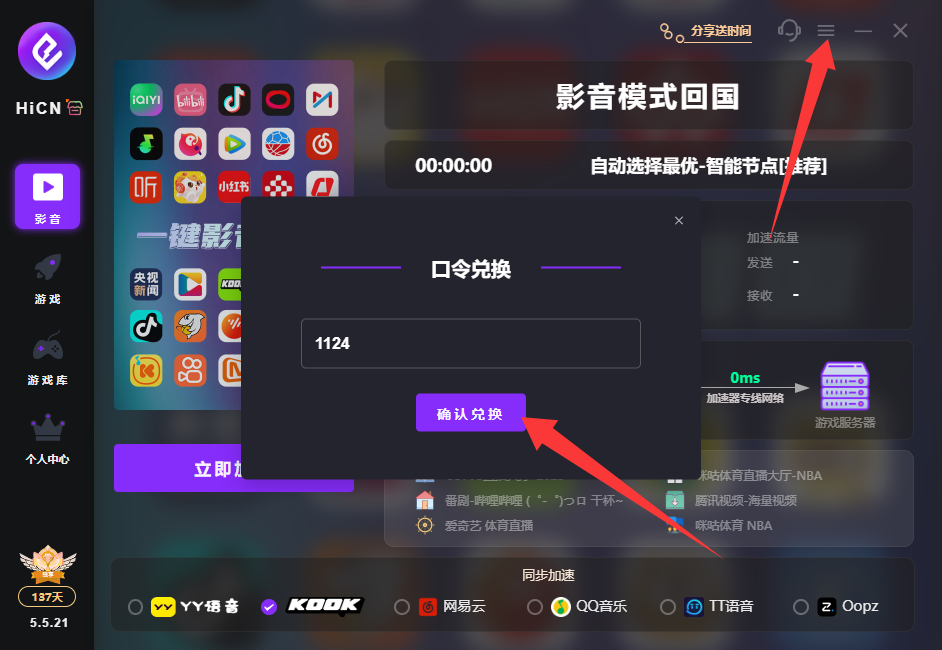
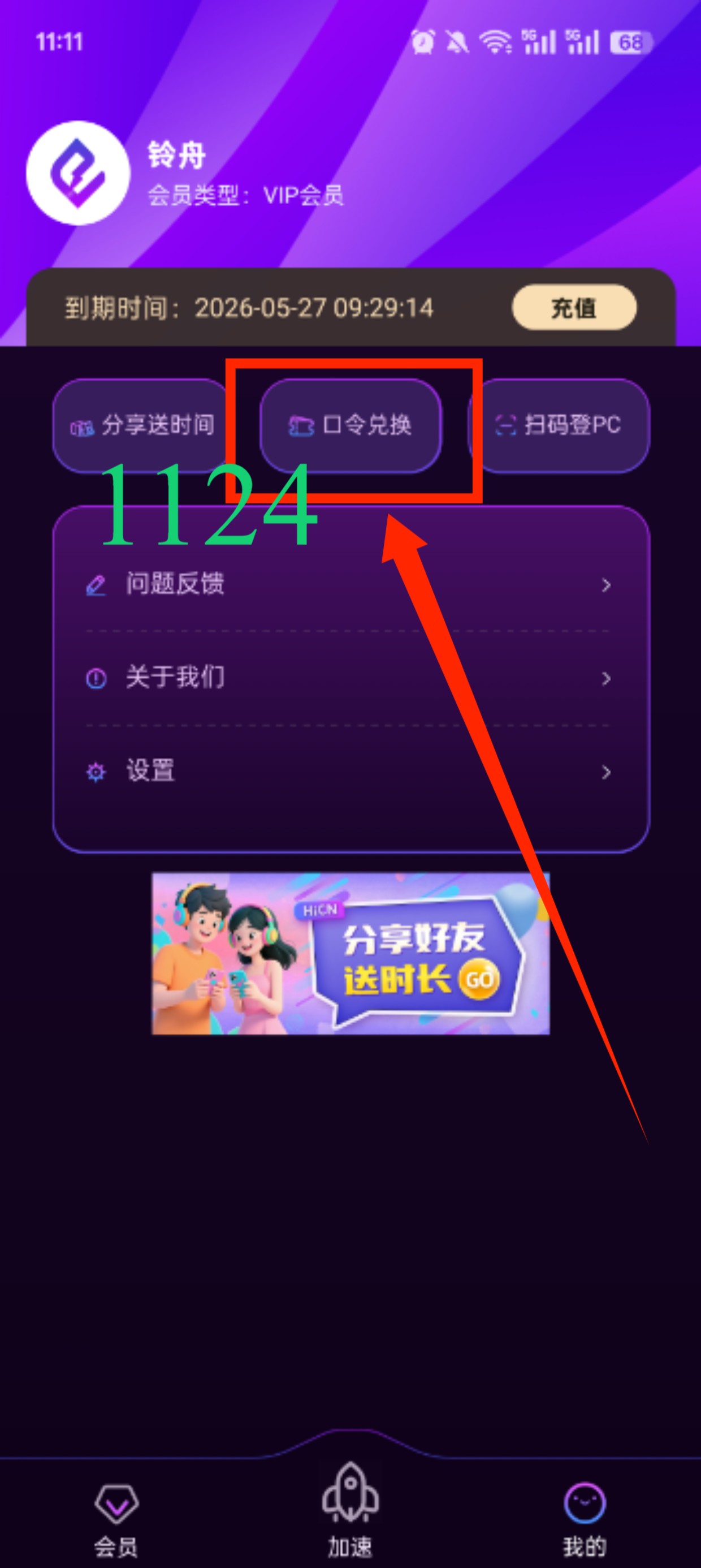
Enter code 1124 to receive free HiCN membership acceleration time.