
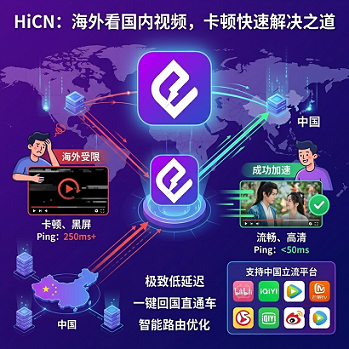
From North America, Europe, Australia to Southeast Asia—whether it's iQIYI, Tencent Video, Bilibili, or Migu, you open the app and it keeps buffering, 1080p drops to 480p, watching a sports game feels like a PowerPoint slideshow... This article skips the jargon and explains in plain language the four real reasons for lag, along with a complete roadmap for solutions from free to paid options.
Preface: Why does it still lag even after installing an accelerator?
For overseas Chinese trying to watch Bilibili anime, Tencent exclusive dramas, or Migu sports live streams, the most frustrating moments are—Even though you have an accelerator, the video is still buffering.
This doesn't necessarily mean the accelerator is bad. Lag when watching videos across borders is actually the result offour overlapping factors.New Cross-Border Network Acceleration Solution: HiCN Technology Analysis and Multi-Scenario Optimization Practice - Baidu Developer Center:
● DNS Resolution: When you enterbilibili.comoverseas, the DNS server has to 'ask for directions' to find where the website is, and this process itself takes time.
● Cross-Border Transmission: Data has to 'swim' across the Pacific from China to your computer. The physical distance is huge, and during peak hours, it gets congested.
● CDN Distribution: Video files are stored on servers in China. If there are no 'branches' overseas, every request has to fetch from China, making it even slower.
● Application Buffering: How the player fetches video and handles network jitter determines how laggy it feels.
By breaking down these four steps, you can clearly identify and fix the specific issue in each link.
I. The Four Culprits of Lag, Explained One by One
Culprit 1: Slow DNS Resolution—like 'navigation taking half a minute to ask for directions'
When you enter a website in your browser, the system first 'asks' the DNS server:What's the IP address of bilibili.com?This process is called DNS resolution.
DNS servers provided by overseas ISPs usually don't have cached records for Chinese video platforms, requiring multiple hops to get the correct IP. Resolution delays can be as high as300-800msSome ISPs even deliberately return incorrect IP addresses or direct you to a very slow node.
How to tell if it's a DNS issue? When opening a video webpage, ifthe page itself loads slowly or stays white for a long time, it's very likely that DNS is the bottleneck.
Culprit 2: Cross-Border Transmission Delay—like 'shipping a package from the US to China'
Data travels from servers in China to your device via undersea cables and multiple ISP hops, covering over 10,000 kilometersNew Cross-Border Network Acceleration Solution: HiCN Technology Analysis and Multi-Scenario Optimization Practice - Baidu Developer Center. Just traveling through the fiber takes over 100 milliseconds round-trip, plus all the routing nodes along the way,delays over 200ms during peak hours are common.
From the US West Coast to Shanghai, the theoretical minimum round-trip delay is about 180ms; if the route detours through Japan or Singapore, add another 30-80ms. Between 8pm and 11pm Beijing time, public internet congestion worsens, packet loss increases, and the experience gets even worseNew Cross-Border Network Acceleration Solution: HiCN Technology Analysis and Multi-Scenario Optimization Practice - Baidu Developer Center.
How to tell if it's a cross-border transmission issue? If during videoplayback you experience frequent buffering or automatic quality drops from 1080p to 480p, but the page loads fine—this means the data is 'stuck in traffic' on the way.
Culprit 3: Low CDN Hit Rate—like 'no warehouse nearby, every order ships from HQ'
Think of a CDN as the video platform's 'local warehouses.' If there's a warehouse (edge node) overseas, you fetch the video directly from there—fast. If there's no coverage or the warehouse doesn't have the video you want, you have tofetch from the main warehouse in China—this is called 'origin fetch.'
The CDN hit rate for popular videos accessed directly overseas is only about35%-55% , meaning nearly half of requests have to fetch from China. For less popular videos or UGC content (Bilibili uploads, short dramas), the hit rate is even lower.
How to tell if it's a CDN issue? Popular shows play fine, butniche videos or old movies are especially laggy—most likely the CDN didn't hit, so every time it fetches from China.
Culprit 4: Application Layer Buffering/Jitter—like 'the player itself didn't handle things well'
The first three are 'road' problems; this one is a 'car' problem—how the player fetches video data.
Streaming protocols like HLS/DASH split the video into many small segments (chunks) and download them one by one.If a chunk is lost, the player has to pause and buffer. If the cross-border link has even a slightly higher packet loss rate, TCP triggers retransmissions and throughput drops sharply. Also, if the player still uses the old HTTP protocol instead of QUIC, handshakes take 1-2 extra round-tripsNew Cross-Border Network Acceleration Solution: HiCN Technology Analysis and Multi-Scenario Optimization Practice - Baidu Developer Center.
How to tell if it's an application layer issue? If initial buffering takes a long time (over 5 seconds), playback has periodic buffering, or switching episodes requires long reloads—these are all player-level problems.
II. Four Layers of Problems, Four Layers of Solutions
Problem Layer | Typical Symptoms | Solution Direction | Cost |
DNS Resolution | Long white screen, slow page load | Enable DoH/Smart DNS | Free |
Cross-Border Transmission | Frequent buffering during playback, quality drops | Return-to-China accelerator/dedicated line | Paid |
CDN Hit Rate | Niche videos are especially laggy | Overseas CDN node coverage | Depends on platform |
Application Buffering | Slow startup, periodic buffering | Dual-path concurrency/protocol optimization | Paid |
III. Solutions: From Free to Hassle-Free, Three Steps
Step 1: Free Solution—Change DNS (done in 5 minutes)
Suitable for users who 'just watch occasionally and don't want to spend money.'
It's very simple::
● iPhone/iPad: Settings → Wi-Fi → Tap the 'i' next to your network → Configure DNS → Manual → Add1.1.1.1(Cloudflare) or8.8.8.8(Google)
● Android: Settings → Network → Private DNS → Set toone.one.one.one
● Windows 11: Settings → Network & Internet → Ethernet/Wi-Fi → DNS server assignment → Edit → Manual → Preferred DNS:1.1.1.1
● Mac: System Settings → Network → Click Wi-Fi/Ethernet → Details → DNS → Add1.1.1.1
After changing DNS, domain resolution time can drop from over 200ms to around 60ms.Zero cost, quick results—but it doesn't solve cross-border congestion or CDN issues.
Step 2: Advanced Solution—Browser Plugins/Scripts (for tinkerers)
If you mainly watch Bilibili in your browser, tryBilibili Acceleratoror similar Tampermonkey scripts. These automatically replace slow Bilibili CDN addresses with faster nodes.
There's also a tool calledCCB (Custom CDN of Bilibili) which uses a speed test script to find the fastest CDN node for your network and then locks onto it.
Pros: Free, no extra software needed
Cons: Only works for Bilibili web, not for other platforms (Tencent Video, iQIYI)
Step 3: Hassle-Free Solution—Return-to-China Accelerator (for long-term overseas users)
If you're overseas long-term and need to watch dramas, live streams, or play China server games, the most worry-free way is todirectly use a reliable return-to-China accelerator.
Why can an accelerator solve the above four problems?
● DNS: A good accelerator comes with encrypted DNS, so you don't need to configure it manually.
● Cross-Border Transmission: Uses dedicated lines/smart routing to reduce peak RTT from 300ms+ to around 100ms.
● CDN: The accelerator routes requests to a domestic entry point, effectively 'fetching from the nearest warehouse' for you.
● Application Buffering: Dual-path concurrency and QUIC protocol optimization, specially tuned for video streaming scenarios.New Cross-Border Network Acceleration Solution: HiCN Technology Analysis and Multi-Scenario Optimization Practice - Baidu Developer Center
What should you look for in an accelerator? Don't just look at the number of nodes. The key factors are:
● Line Quality: Are there dedicated lines, is the bandwidth sufficient?
● Smart Routing: Can it automatically switch to the best node based on real-time network conditions?New Cross-Border Network Acceleration Solution: HiCN Technology Analysis and Multi-Scenario Optimization Practice - Baidu Developer Center
● Dual-Path/Redundancy: If one line fails, can the other take over seamlessly?
● Platform Coverage: Does it work on Windows, Mac, iOS, Android, and TV boxes?
IV. What Level is HiCN?
HiCN is a return-to-China accelerator designed specifically for overseas ChineseiPhone version 'Today' - App Store, covering200+ global nodesNew Cross-Border Network Acceleration Solution: HiCN Technology Analysis and Multi-Scenario Optimization Practice - Baidu Developer Center, supporting major platforms like Bilibili, iQIYI, Tencent Video, Migu Video, Douyin, etc.iPhone version 'Today' - App Store, as well as popular China server games like Honor of Kings and League of LegendsiPhone version 'Today' - App Store.
Its key capabilities include:
● Dual-Path Backup Network: Two links run in parallel; if one fails, the other takes over automatically,with seamless switching during node failures.
● Smart Routing: Routing strategies update every 30 seconds, dynamically choosing the optimal path.New Cross-Border Network Acceleration Solution: HiCN Technology Analysis and Multi-Scenario Optimization Practice - Baidu Developer Center
● Dedicated Line Intelligent Interconnection: Low latency, no packet loss.
● Full Scenario Coverage: Games, live streaming, video, and office needs all in one solution.iPhone version 'Today' - App Store
Reference Latency(Official public data)Detailed Comparison: HiCN VIP Membership vs. Dedicated Line—Helping You Choose Wisely:
● Playing China server games from Asia:20-100ms
● From Europe, America, Australia:130-260ms
Free Trial: New users get a 3-day VIP trial. Enter code 1124 for additional membership time.
V. How Should You Choose? One Chart Explains It All
Your Situation | Recommended Solution | Cost |
Occasionally watch Bilibili, just want it to work | Change DNS (DoH/1.1.1.1) | Free |
Mainly use browser for Bilibili, willing to tinker | Change DNS + Bilibili CDN switching script | Free |
Watch dramas frequently, use multiple platforms | Return-to-China accelerator (VIP tier) | Medium |
Watch 4K/live streams/play games, need ultimate stability | Return-to-China accelerator (dedicated line tier)Detailed Comparison: HiCN VIP Membership vs. Dedicated Line—Helping You Choose Wisely | Higher |
A Few Common Misconceptions
Myth 1: 'The more nodes, the better'
More nodes doesn't mean better quality. The key iswhether bandwidth is sufficient, lines are stable, and there's redundancy. Two high-quality dedicated lines are much more reliable than 20 cheap nodes.
Myth 2: 'With an accelerator, you can watch everything'
Accelerators solvenetwork linkissues. Whether you can watch a video or watch in 4K also depends onwhether the platform provides the content, whether your device can decode it, and whether your bandwidth is sufficient..
Myth 3: 'Free accelerators are enough'
Free options are often unstable—hard to connect during peak times, poor node quality, and no privacy/security guarantees. Occasional use is fine, but for regular drama watching or live streaming, paid options are recommended.
Summary
Lag when watching Chinese videos overseas is essentially due tofour overlapping factors:
1. DNS Resolution—cheapest, just change a setting to fix it.
2. Cross-Border Transmission—physical distance can't be shortened, optimized via dedicated lines/smart routing.
3. CDN Hit Rate—depends on the platform; accelerators can help you 'take a shortcut.'
4. Application Buffering—solved via dual-path concurrency and protocol optimization.
For most long-term overseas users, the most hassle-free solution is: change DNS + a reliable return-to-China accelerator. DNS solves the first hurdle for free; the accelerator handles the other three.
If you're choosing an accelerator, focus ondual-path concurrency, smart routing, and multi-device coverage—these are the key features. HiCN has a comprehensive implementation in this directionNew Cross-Border Network Acceleration Solution: HiCN Technology Analysis and Multi-Scenario Optimization Practice - Baidu Developer Center, and new users get free trials and promo codes (redeem code 1124 ). Give it a try before you decide.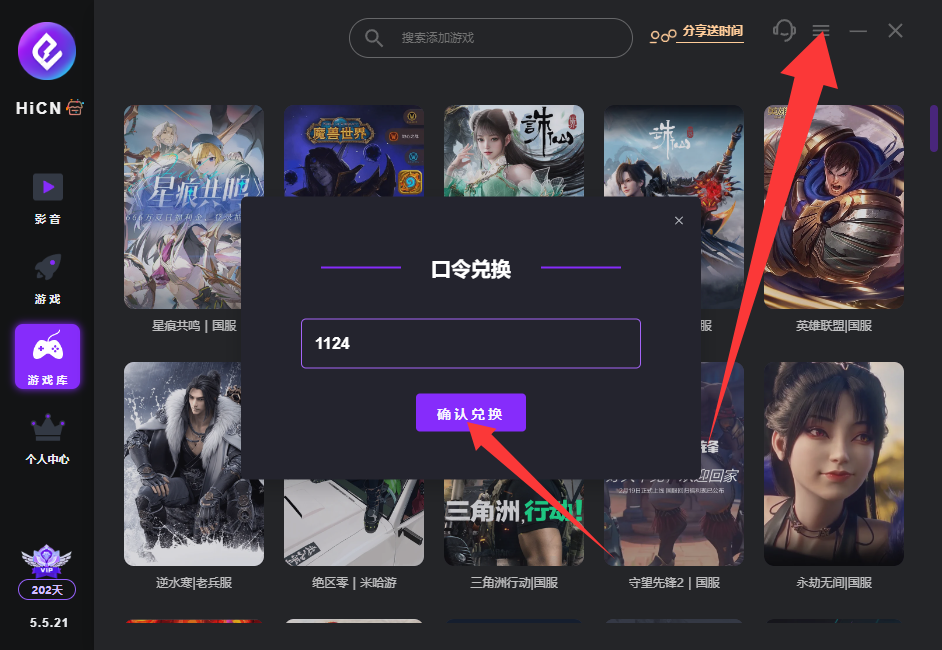
⚠️ Note: The latency data in this article is based on typical scenario tests. Actual values may vary depending on time, ISP, node, and platform policies, and do not constitute an SLA guarantee for any single service or line. Please use the trial period to test and verify before formal use.